During Holi, timelines across social platforms fill with vibrant portraits covered in gulal and dramatic color bursts. Traditionally celebrated as the festival of colors marking the arrival of spring, Holi has now extended into digital creativity — especially through AI-powered photo transformations.
This guide explains how Holi AI photo prompts work, which platforms are commonly used, how to prepare your image correctly, and how to create stylish, cinematic, and social-media-ready festival portraits using documented AI and photography principles.
What Is a Holi AI Photo Editing Prompt?
A Holi AI photo prompt is a detailed written instruction used in generative AI tools to create festival-inspired portraits. The prompt describes:
- Clothing (white kurta, casual shirt, streetwear)
- Color effects (gulal splashes, powder explosions)
- Lighting style (golden hour, backlit glow, dramatic shadows)
- Camera angle (close-up, waist-up, wide cinematic shot)
- Mood (joyful, intense, slow-motion action)
According to official documentation from OpenAI and Adobe, prompts act as natural-language instructions. Clear and detailed prompts improve output accuracy and visual consistency.
Some AI systems also support reference-image workflows, allowing users to upload their own photo so facial structure is preserved while the environment is transformed.
Stylish Holi AI Prompt
Below are structured prompts built using documented prompt-engineering principles.
Google Gemini Trending & Stylish Holi AI Photo Prompts
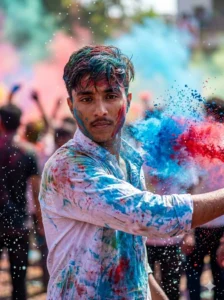
Prompt: FACE MATCHING INSTRUCTIONS — STRICT ZERO CHANGE MODE: Face must remain exactly the same as reference image. No age change. No smile enhancement. No skin smoothing. No facial reshaping. Preserve exact expression, skin tone, pores, and facial structure. Ultra-HD razor sharp clarity, zero blur. ASPECT RATIO • 3:4 vertical IMAGE STYLE: Ultra-realistic high-resolution DSLR Holi action portrait. Natural cinematic tones. Rich but realistic colors.
SUBJECT DETAILS: Short slightly messy hair wet with colored water. White shirt partially soaked with gulal and splash stains. Athletic natural body posture. POSE DETAILS — SIDE THROW ACTION: Body slightly turned sideways. One hand forcefully throwing blue and red gulal diagonally across frame. Other hand stretched backward mid-motion. Face looking directly at camera with same natural expression from reference. HOLI MOOD & EFFECT DETAILS:
Powder burst frozen mid-air. Water droplets sparkling in sunlight. Background crowd blurred but energetic. Color smoke drifting dynamically. BACKGROUND DETAILS: Outdoor Holi street celebration. Soft blurred dancing silhouettes. Vibrant color haze. LIGHTING DETAILS:
Bright daylight with subtle rim light around hair and shoulders. Face evenly exposed and extremely sharp. CAMERA & COMPOSITION: Half-body vertical portrait. 50mm lens compression. Fast shutter freeze action. Crisp powder texture. NEGATIVE PROMPT: Identity change, face distortion, smoothing filter, artificial skin, blur, CGI look, extra fingers, warped hands, watermark, logo, text..
Top Holi AI Photo Editing Prompt For Men
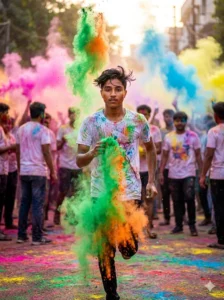
Prompt:FACE MATCHING INSTRUCTIONS — STRICT ZERO CHANGE MODE. Absolute identity preservation. No changes in age, smile, texture, pores, jawline, or tone. Ultra-detailed clarity.
ASPECT RATIO • 3:4 vertical IMAGE STYLE: Cinematic DSLR Holi action portrait. Natural vibrant tones. SUBJECT DETAILS: Wet hair slightly flying due to motion. White t-shirt soaked with colorful splashes. POSE DETAILS — RUNNING TOWARD CAMERA: Subject running toward camera while throwing green and orange powder upward. One leg slightly forward mid-stride. Same joyful natural expression from reference. HOLI MOOD & EFFECT DETAILS Color smoke trailing behind. Powder cloud rising upward. Ground covered in bright gulal. BACKGROUND DETAILS: Open street festival. Soft bokeh crowd celebrating. Color haze floating in sunlight. LIGHTING DETAILS: Backlit sunlight creating glowing outline around subject. Face fully sharp and evenly exposed. CAMERA & COMPOSITION: Mid-action freeze frame. 50mm cinematic compression. Dynamic depth of field. NEGATIVE PROMPT: Identity change, blur, low resolution, CGI texture, warped limbs, artificial skin.
ChatGPT Holi AI Photo Editing Prompt For Boy
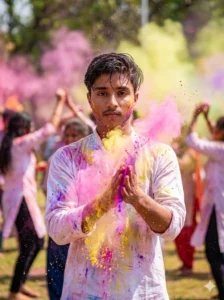
Prompt: FACE MATCHING INSTRUCTIONS — STRICT ZERO CHANGE MODE: No alteration of facial expression, structure, texture, pores, or tone. 100% accurate identity preservation. Ultra-HD sharpness. ASPECT RATIO • 3:4 vertical IMAGE STYLE: Hyper-real DSLR Holi portrait with cinematic festival color grading. SUBJECT DETAILS: Slightly wet hair pushed back. White kurta drenched in multicolor splashes. POSE DETAILS — DOUBLE HAND COLOR BURST: Both hands clapping colored powder toward camera creating explosion effect. Head slightly tilted forward. Same original expression from reference. HOLI MOOD & EFFECT DETAILS: Massive pink, yellow, and purple powder cloud covering frame edges. Fine powder particles visible. Water mist mixed in air. BACKGROUND DETAILS: Park celebration with blurred dancing crowd. Vibrant festival smoke layers. LIGHTING DETAILS: Strong sunlight from side creating dramatic powder glow. Face perfectly lit and crystal clear. CAMERA & COMPOSITION: Waist-up vertical portrait. Action frozen mid-explosion. Razor sharp face focus. NEGATIVE PROMPT: Face morphing, smoothing, low quality, blur, unrealistic skin, extra limbs, distorted fingers, watermark.
Best AI Tools for Holi Photo Editing
There is no official Holi AI image generator. However, widely used platforms support detailed text-to-image workflows:
Each platform generates visuals based on descriptive prompts. Output realism depends on prompt clarity and input image quality.
Final Take
Holi AI photo editing reflects a broader shift in digital creativity. Generative AI tools allow users to combine traditional celebration themes with cinematic photography aesthetics — without professional cameras or studio lighting.
There is no official Holi AI platform, but documented prompt-engineering practices and photography principles make it possible to create stylish, social-media-ready festival portraits. As generative tools become more accessible, seasonal AI edits are likely to remain a recurring creative trend among digital-first creators.