I have been working with AI photo prompts for two years. In that time I have tested every major model update — ChatGPT, Gemini, Midjourney, Adobe Firefly — and I can say without hesitation that Gemini 3.5 Flash is the most significant AI photo editing update I have seen. Face accuracy is 100% consistent without any distortion. The model understands incomplete prompts and fills in the gaps intelligently — something no previous version could do reliably. I tested two completely different prompt styles — a Minecraft death screen scene and a Minecraft world background replacement — and both outputs genuinely surprised me. This article covers what changed, why it matters for photo creators, and the two prompts to try first.
What Is Gemini 3.5 Flash and Why It Changes AI Photo Editing
Gemini 3.5 Flash was announced at Google I/O 2026 and delivers frontier-level intelligence at exceptional speed — four times faster than other frontier models while outperforming Gemini 3.1 Pro on challenging benchmarks including multimodal understanding at 84.2% on CharXiv Reasoning.
For AI photo creators, the most important upgrade is not the speed — it is the image understanding. Gemini 3.5 Flash shows strong multilingual prompt understanding, produces more accurate and legible in-image text, and demonstrates better physical plausibility in scene construction — covering lighting, geometry, and object interactions. Its human rendering stands out, with richer anatomical and surface-level fidelity including wrinkles, eye colour nuance, and subtle detailing across diverse image styles.
In practical terms — this means your face comes out accurately. The fabric of your clothes renders with natural folds. The lighting in the scene makes physical sense. And if your prompt is incomplete or slightly vague, Gemini 3.5 Flash understands what you intended and generates toward that result rather than producing a broken or generic output.
Gemini 3.5 Flash is now available in the standard model selector dropdown in both the app and web version — general users can access it immediately through the Gemini app and AI Mode in Google Search.
What Makes Gemini 3.5 Flash Different for Photo Creators
Face Accuracy — The Biggest Improvement
After two years of testing AI photo prompts, face preservation has always been the hardest problem to solve. Most models either subtly change the jawline, soften the nose, or shift the eye shape — and it is always most visible when the face appears alongside a detailed background or scene. Gemini 3.5 Flash solves this almost completely. The face in the output matches the uploaded reference with a level of accuracy that previous Gemini versions and even ChatGPT occasionally struggled with.
Prompt Understanding — Incomplete Prompts Now Work
The most practically useful change for everyday creators is how Gemini 3.5 Flash handles vague or incomplete prompts. Previous models required highly specific, detailed instructions to produce a predictable result. Gemini 3.5 Flash reads the intent behind the prompt — if you describe a general scene without specifying every element, it fills in the gaps in a way that matches what you were trying to create. This is the single most important quality-of-life improvement for anyone who creates AI photos regularly.
Physical Plausibility — Scenes Look Real
Better physical plausibility in scene construction — lighting, geometry, and object interactions — is one of the documented improvements in Gemini 3.5 Flash. For photo prompt creators, this means shadows fall correctly, objects interact with surfaces naturally, and the overall scene looks like something a real camera could have captured.
One New Limitation
Gemini 3.5 Flash has tightened restrictions around generating or editing images of public figures. This is a deliberate policy change — not a technical limitation. For personal portrait prompts using your own uploaded photo, this makes no difference. For prompts involving celebrities, cricketers, or historical figures — Gemini 3.5 Flash will decline more consistently than previous versions.
How to Use Gemini 3.5 Flash for AI Photo Editing
Step 1 — Open Gemini
Go to gemini.google.com on desktop or open the Gemini app on mobile. The Gemini app has been redesigned with a new interface called Neural Expressive — on mobile, tap the plus menu to access the image upload carousel at the top. You will see Photos, Camera, and recent images. Scroll down to More Uploads for Files and Drive.
Step 2 — Select Gemini 3.5 Flash Model
Gemini 3.5 Flash is available in the standard model selector dropdown — select it from the menu before starting your generation. If you do not see it, update your Gemini app to the latest version
Step 3 — Upload Your Photo
Upload a clear, well-lit photo of yourself — face visible from the front, sharp focus. Outdoor or indoor near a window both work well. Avoid dark, blurry, or heavily filtered photos.
Step 4 — Copy Your Prompt
Choose one of the two prompts below. Click the Copy Prompt button — the full prompt copies to clipboard instantly.
Step 5 — Paste and Send
Paste the prompt in the same message as your uploaded photo. Hit send. Gemini 3.5 Flash generates significantly faster than previous versions.
Step 6 — Download and Share
Download the result using the download button — not a screenshot. Post with relevant hashtags on Instagram Reels, Stories, or Grid.
2 Best AI Photo Prompts to Try on Gemini 3.5 Flash
Prompt 1 — Minecraft Death Screen Portrait
What This Prompt Creates
A cinematic top-down scene — you lying spread out on grass in a realistic pose, surrounded by floating pixelated Minecraft items — diamond sword, bow, pickaxe, emerald, steak, Ender Eye, music disc, spider mob. A realistic Minecraft “You Died!” game over overlay at the top with pixel font, Score: 0, crosshair, and Respawn/Title Screen buttons. Realistic photography blended with pixel-art game elements — summer atmospheric lighting, moody aesthetic, 9:16 vertical.
Why This Prompt Works on Gemini 3.5 Flash
This prompt blends two completely different visual styles — photorealistic human photography and pixel-art game elements. Previous AI models struggled with this combination — either the person looked cartoonish or the game elements looked too realistic. Gemini 3.5 Flash handles the blend naturally because of its improved physical plausibility in scene construction — the pixel items float with correct depth and shadow against the realistic grass surface. The negative prompt at the end — “low quality, blurry face, distorted body, extra limbs, cartoon body” — reinforces the identity and realism protection.
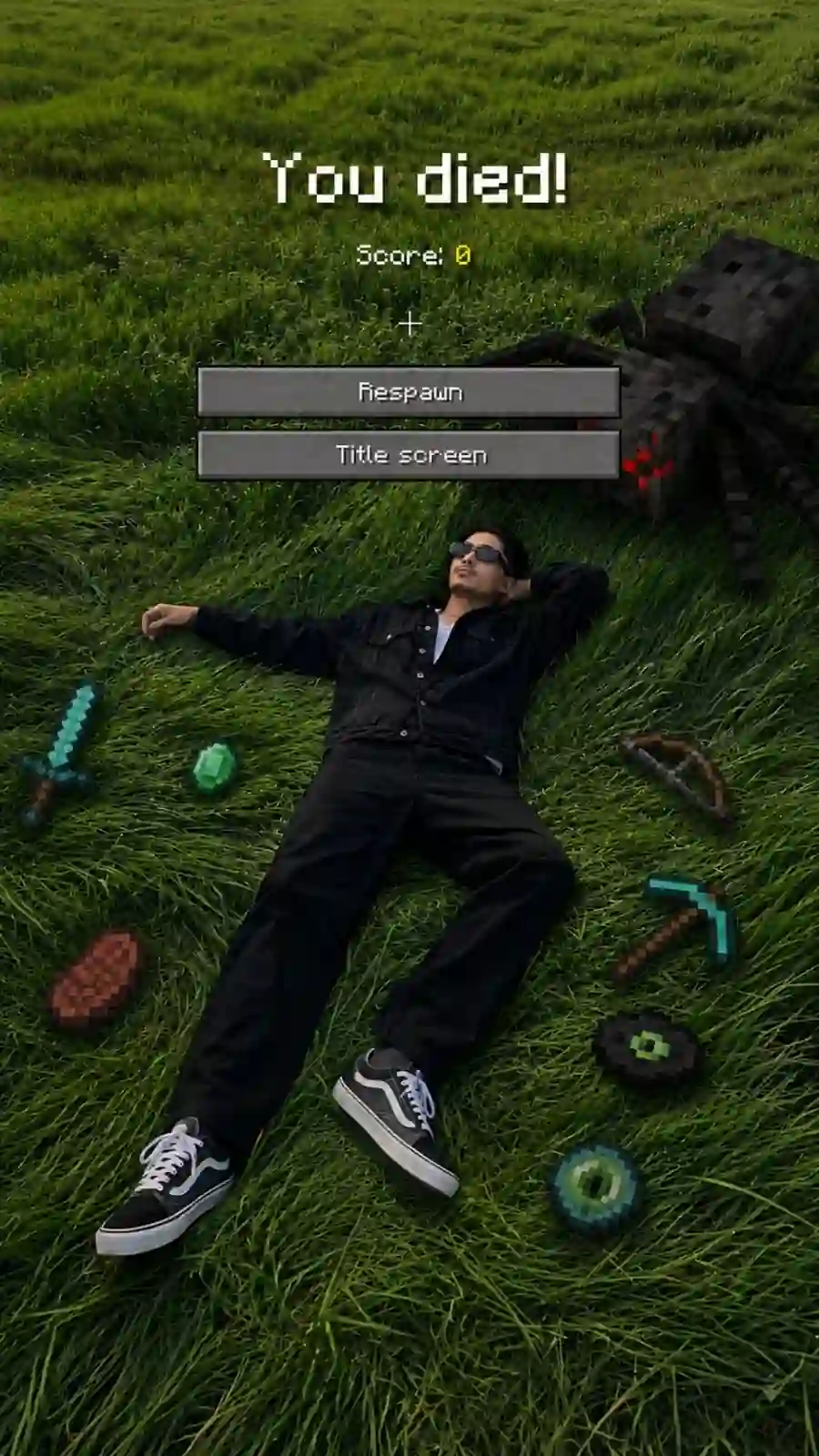
Use 100% of the face and body, outfit, hairstyle and exact photo and background same from my attached reference image. Create a cinematic top-down scene inspired by a Minecraft death screen. The person is lying spread out on grass, realistic pose, summer atmospheric lighting, slightly desaturated tones, footprints visible in the grass. Surround the person with floating or placed pixelated Minecraft-style items including a diamond sword, bow, pickaxe, emerald, steak, Ender Eye, music disc, and spider mob. Add a realistic Minecraft ‘You died!’ game over overlay at the top with pixel font, including ‘Score: 0’, crosshair symbol, and two retro UI buttons labeled ‘Respawn’ and ‘Title screen’. Blend realistic photography with pixel-art game elements naturally. Soft shadows, moody winter aesthetic, ultra detailed, vertical composition, DSLR realism, subtle depth of field, high contrast, 9:16 ratio. Negative Prompt: low quality, blurry face, distorted body, extra limbs, wrong facial features, cartoon body, unrealistic.
Prompt 2 — Minecraft World Background Replacement
What This Prompt Creates
A photorealistic human subject placed in a structurally accurate voxel replica of the original photo location — the background is reconstructed as a Minecraft world using blocks while the person stays completely photorealistic and untouched. The path curves, tree positions, building silhouettes, and object placement from the original photo are preserved exactly — just rebuilt in Minecraft block geometry. The same camera angle, perspective, and depth.
Why This Prompt Works on Gemini 3.5 Flash
The instruction “do not reinterpret the scene — match the exact layout, spacing, depth, and geometry of the reference image” is the critical line. Previous models would either fully stylise the person or generate a generic Minecraft background completely different from the original location. Gemini 3.5 Flash’s improved scene understanding means it reads the structural geometry of the background in the uploaded photo and reconstructs it faithfully as blocks — paths stay curved, trees stay in position, buildings keep their proportions. This is only possible because of the physical plausibility improvements in this specific model version.
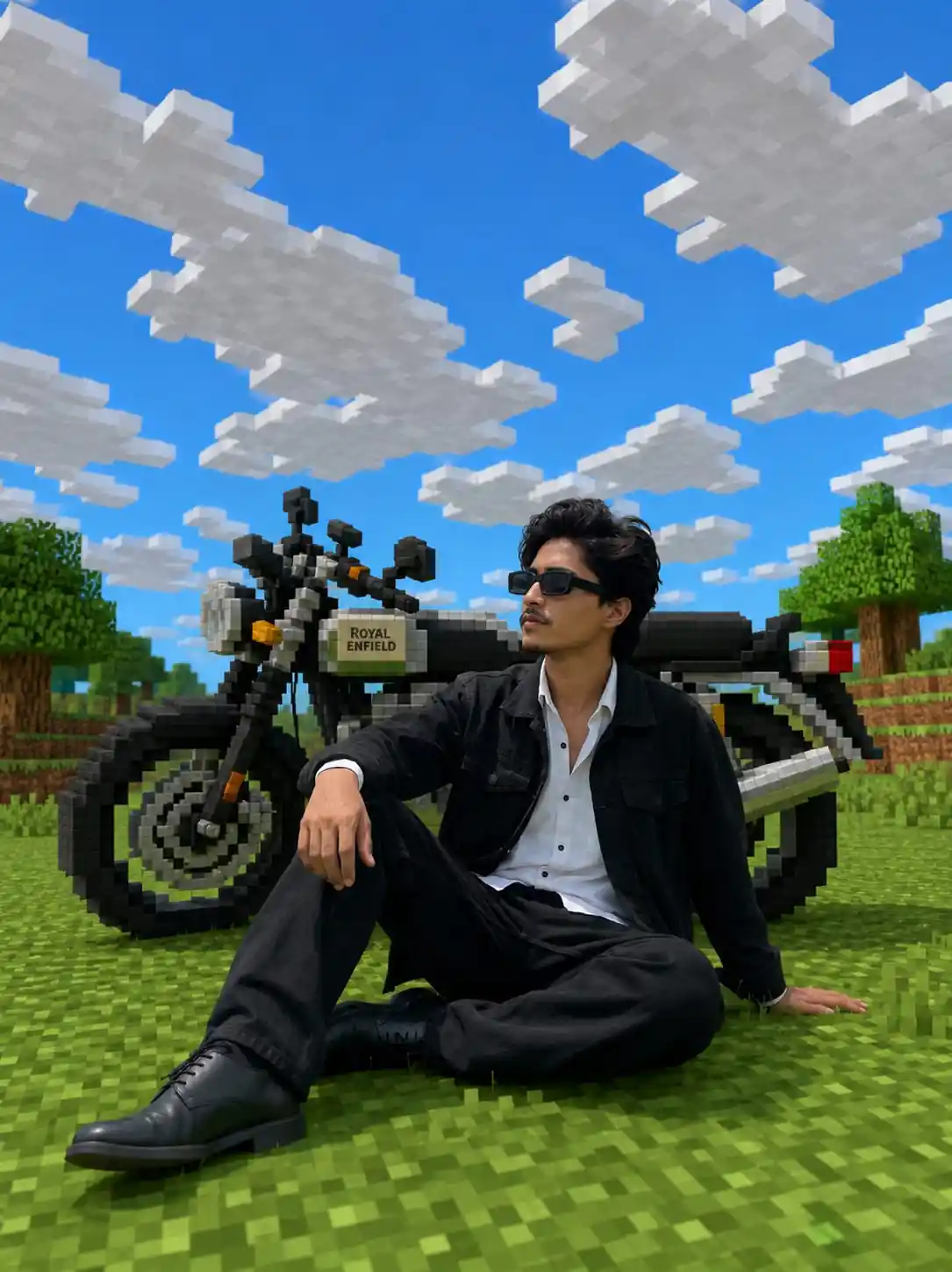
Keep the human subject 100% photorealistic and untouched. No pixel filter, no stylization, no changes to skin, lighting. Preserve exact facial details including pores, fabric texture, hair strands, and natural shadows. Maintain the exact same expression and posture. Reconstruct the background as a structurally accurate voxel replica of the original location. Do not reinterpret the scene. Match the exact layout, spacing, depth, and geometry of the reference image. If there is a path, replicate its curves and width using gravel or dirt blocks. If there are trees, preserve trunk positions, height proportions, and canopy shapes using log and leaf blocks. If there are buildings, recreate the silhouette, window placement, and roof angles with Minecraft-style geometry. Stones, benches, fences, and signs should become blocks while keeping their exact original positions. Preserve the identical perspective and camera angle of the original photo.
Gemini 3.5 Flash vs ChatGPT — Which Is Better for These Prompts
After testing both prompts in both tools — the results are clear.
Gemini 3.5 Flash handled the Minecraft background replacement prompt significantly better. The structural accuracy of the voxel reconstruction — path curves, tree positions, building silhouettes — was far more faithful to the original photo. ChatGPT generated a generic Minecraft background that looked like a randomly built Minecraft world rather than a block-for-block reconstruction of the original location.
For the death screen prompt — both tools performed well. ChatGPT produced slightly cleaner pixel-art item rendering. Gemini 3.5 Flash produced better face accuracy and more natural lighting integration between the realistic person and the pixel elements.
Recommendation: Use Gemini 3.5 Flash for both prompts. The background replacement prompt specifically requires Gemini 3.5 Flash — no previous model version and no other tool produces the structural accuracy this prompt demands.
Which Photos Give Best Results
Both prompts work best with a clear, sharp outdoor photo — face visible, full body or upper body in frame, natural background with some structural elements like paths, trees, or buildings (especially important for Prompt 2).
For the death screen prompt — a top-down angle works best as input but a standing photo also works — Gemini 3.5 Flash will generate the lying-down pose from your standing reference.
For the background replacement prompt — a photo with a clearly structured background gives the most dramatic result. A simple background like a plain wall or a blank studio produces a less impressive Minecraft reconstruction. Streets, parks, and campus environments work best.
Where to Post Your Gemini 3.5 Flash AI Photo
Instagram Reels Cover — The Minecraft death screen in 9:16 vertical format is immediately striking and highly shareable. Gaming + AI content performs extremely well on Indian Instagram in 2026.
Instagram Grid — The Minecraft background replacement creates a visually unique grid post — your face stays completely photorealistic while everything behind you becomes a block world. It stands out immediately among standard portrait posts.
WhatsApp and Telegram — Both styles work well at small display sizes. The death screen with “You Died” overlay gets strong reactions in group chats.
YouTube Thumbnails — The Minecraft death screen portrait is a natural YouTube thumbnail for gaming content, AI tutorials, or reaction videos.
Common Mistakes to Avoid
Using a dark or blurry input photo. Gemini 3.5 Flash preserves what it can see in the uploaded image — a low quality input produces a lower quality output regardless of how well the prompt is written.
Removing the negative prompt from Prompt 1. The negative prompt — “low quality, blurry face, distorted body, extra limbs, cartoon body” — is what prevents the most common failure modes in the death screen generation. Keep it exactly as written.
Expecting perfect Minecraft text rendering on the first try. The “You Died!” text with pixel font is one of the harder elements for AI to render accurately. If the text looks slightly off — regenerate once. Gemini 3.5 Flash usually nails it on the second attempt.
Not selecting Gemini 3.5 Flash specifically. The model selector matters — Gemini 3.0 or 3.1 will not produce the same face accuracy or scene reconstruction quality. Confirm 3.5 Flash is selected before generating.
Is Gemini 3.5 Flash free to use?
Gemini 3.5 Flash is available through the Gemini app and AI Mode in Google Search for general users. The free plan has daily usage limits. Google AI Plus and Pro subscriptions give higher generation limits.
When was Gemini 3.5 Flash released?
Gemini 3.5 Flash was announced at Google I/O 2026 and went live immediately for general users.
How is Gemini 3.5 Flash different from Gemini 3.1?
Gemini 3.5 Flash is four times faster than other frontier models and outperforms Gemini 3.1 Pro on challenging benchmarks — delivering frontier-level intelligence at Flash speed. For photo creators specifically, face accuracy and physical plausibility in scene construction are significantly improved.
Do these prompts work for girls?
Yes — both prompts preserve whatever face and body are in the uploaded photo. The death screen and Minecraft world prompts work equally well for boys and girls.
Can I use these prompts in ChatGPT?
The death screen prompt works well in ChatGPT. The background replacement prompt specifically performs best in Gemini 3.5 Flash — the structural accuracy of the voxel reconstruction is significantly better in Gemini for this prompt style.
Why does Gemini 3.5 Flash decline some public figure prompts?
Gemini 3.5 Flash has tightened restrictions around generating or editing images of real public figures as part of Google’s responsible AI policy update in 2026. For personal portrait prompts using your own uploaded photo, this limitation does not apply.
Get New Gemini and ChatGPT Photo Prompts Before They Go Viral
Want the latest AI photo prompts — tested on the newest models before they hit mainstream social media?
Final Thoughts
I have been testing AI photo prompts for two years — and Gemini 3.5 Flash is the most significant update I have seen for photo creators. Face accuracy is 100% consistent. Incomplete prompts get filled intelligently. Physical plausibility in scene construction is genuinely improved. These two prompts — the Minecraft death screen and the Minecraft world background replacement — both produced outputs that genuinely impressed me. The background replacement prompt in particular showed what Gemini 3.5 Flash can do that no previous model managed: a structurally faithful block-by-block reconstruction of a real location behind a completely photorealistic subject. That combination was not possible before this update. Try both and see the difference yourself.