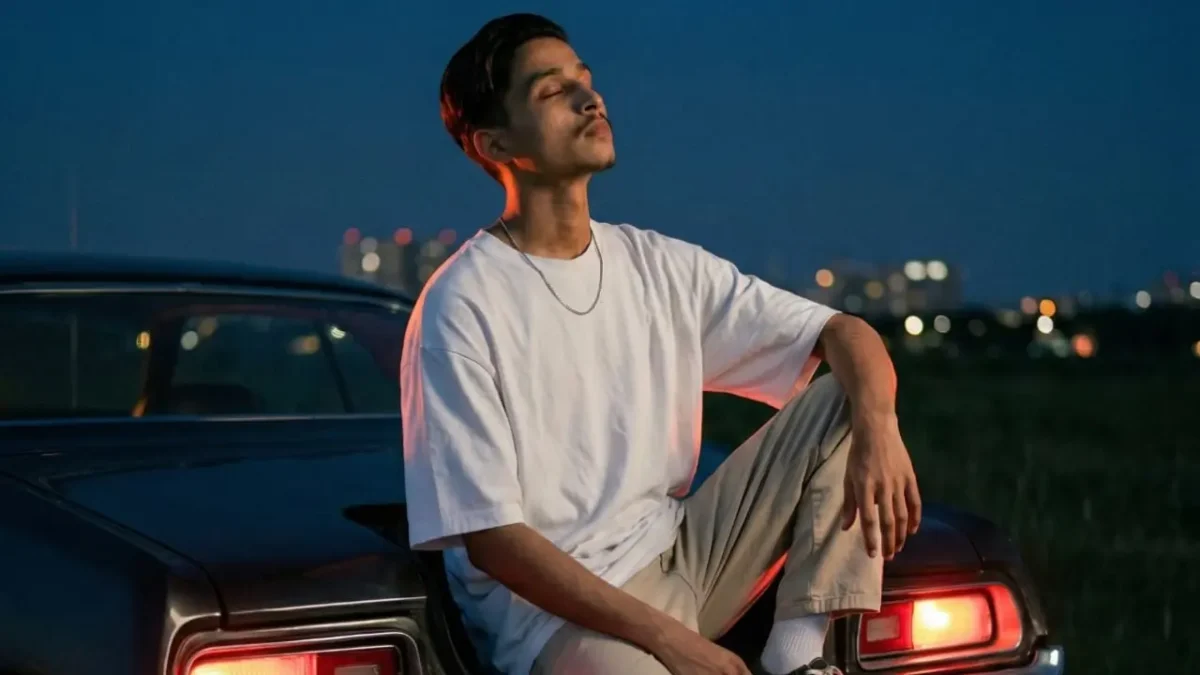
AI-generated photos are no longer limited to simple edits — they’re now becoming a full lifestyle trend. From luxury setups to cinematic shots, users are creating high-quality visuals using AI tools without stepping into a real photoshoot. Platforms from Google like Google Gemini, along with tools from OpenAI and Adobe, allow users to generate realistic car-themed photos using just prompts and their own image.
In 2026, car AI photo editing prompts are trending because they combine attitude, luxury, and cinematic aesthetics — something that performs extremely well on Instagram and short-form platforms. This guide explains how these prompts work and how you can create stunning car-style AI images using your own photo.
What Are Car AI Photo Editing Prompts?
A car AI photo editing prompt is a written instruction used to generate images where a person is placed in a car-themed environment. These prompts describe:
- Car type (sports, luxury, street car)
- Background (city, highway, night street)
- Lighting (sunset, neon, headlights)
- Mood (attitude, calm, cinematic)
According to AI documentation, detailed prompts help models generate more realistic and accurate visuals.
Classic Car AI Photo Prompt
Prompt: use uploaded photos strictly as reference for face identity, facial features, body anatomy, proportions, and skin tone and even the sunglasses only and Create a hyper-realistic cinematic night fashion portrait in an outdoor grassy field at blue hour. A dark vintage 1970s muscle car is parked behind the subject with red tail lights glowing brightly. Sky is deep navy blue with soft gradient. Distant lights blurred in background.Framing:
Vertical 4:5.
Camera slightly below eye level.Pose:
Subject sitting on the car trunk edge.
One leg bent resting on bumper.
Other foot touching ground.
Elbows resting loosely on knees.
Head tilted slightly upward.
Eyes closed or looking toward sky.
Relaxed but powerful posture.Wardrobe:
Oversized white t-shirt with realistic cotton texture.
Loose beige pants with natural creases.
White socks.
Thin chain necklace.Lighting:
Red tail lights creating strong warm back rim glow on shoulders and neck.
Cool blue twilight ambient light softly illuminating face.
Balanced cinematic contrast.Camera:
Full-frame.
50mm lens.
f/1.8.
ISO 800–1000.
1/125s shutter.
Shallow depth of field.Color science:
Teal shadow tones.
Warm red highlights.
Deep blacks.
Subtle film grain.
No artificial filters.High texture realism:
Grass detail.
Metal reflections.
Natural skin pores.
Fabric wrinkles.STRICT IDENTITY LOCK:
All facial features, hairstyle, beard style, skin tone, and full body anatomy MUST match uploaded reference images exactly.
No reinterpretation.
No symmetry correction.
No modifications allowed.
Best AI Tools for Car Photo Editing
There is no official car AI editing tool, but several platforms support this style.
Using Google Gemini
Google Gemini allows users to experiment with detailed prompts. By describing cars, lighting, and mood, users can generate realistic automotive-style visuals.
Using OpenAI Image Tools
OpenAI models support detailed text-to-image generation, making it easy to create cinematic car scenes.
Using Adobe Firefly
Adobe tools help refine lighting, textures, and color grading — important elements in automotive photography.
Final Take
Car AI photo prompts are turning everyday photos into cinematic lifestyle visuals. Instead of renting expensive cars or booking photoshoots, users can now create premium content using just a prompt and a good image.
As tools like Gemini continue evolving in 2026, automotive-style AI edits are expected to grow even more — especially among creators who want to showcase confidence, style, and ambition through their visuals.