5 Viral ChatGPT Photo Editing Prompts for Instagram 2026 — Korean Pose, Bokeh, Outfit Swap & More
May 19, 2026
21 min read
Found these on Instagram Reels, tested them in ChatGPT, refined until the results were actually impressive. These 5 prompts — Korean rose portrait, DSLR bokeh, phone swap, outfit swap, and background swap — are the best I have tried. Copy, paste, try today.
I came across these editing styles while scrolling Instagram Reels. The prompts I found online initially gave average results — flat output, unnatural edges, and faces that looked slightly off from the original. So I refined each one using AI assistance, tested them in ChatGPT, and rebuilt them until the output was genuinely impressive. These five are the final versions — and I can say with confidence these are some of the best AI photo editing prompts trending on Instagram right now.
Why These Prompts Are Different From What You Find Online
Most prompt lists you find online are copy-pasted from each other. Same generic lines, same vague instructions, same disappointing results. The problem is not the idea — it is the execution. A poorly written prompt gives the AI too much creative freedom, and it fills in the gaps with things you did not ask for.
Every prompt in this list is written with a specific purpose behind each line. The face is locked. The framing is protected. The lighting is defined. That level of detail is exactly what separates a scroll-stopping result from a generic AI image.
All five prompts have been tested in ChatGPT with GPT-4o image mode. Upload your photo, paste the prompt, and generate.
Prompt 1 — Korean Rose Boy Portrait
What This Prompt Creates
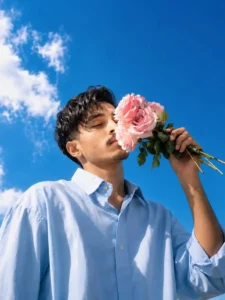
This prompt creates a dreamy, romantic Korean aesthetic portrait — a handsome boy holding pink roses against a vivid blue sky, shot from a dramatic low worm-eye angle. It is one of the most visually striking styles currently trending on Indian Instagram Reels and is performing especially well as a Reels cover and profile photo.
Rose Boy Prompt
A real handsome young (Use my face refrence uploded image) boy with short naturally messy slightly wavy dark black hair with loose strands falling softly over forehead and temples and light mustache, sharp elegant facial bone structure, eyes peacefully and completely closed, face gently tilted upward and to the side, soft lips lightly touching and pressing against the delicate petals of large pink roses held up near face level, one arm raised holding a small gathered bouquet of three to four large fully bloomed beautiful soft blush pink garden roses with fresh green stems and dark green leaves held upward at face level, other arm hanging relaxed at side, wearing oversized relaxed fit light sky blue pastel long sleeve button up collared shirt with sleeves slightly rolled, extreme dramatic low worm eye view camera angle looking steeply upward at figure positioned against open sky, vivid brilliant royal blue clear sunny sky filling entire upper and majority of frame behind him, soft white fluffy loosely painted style cumulus clouds visible on left side of sky, warm bright natural summer daylight with sunlight illuminating face from side, hyper-realistic 8K photography, dreamy romantic Korean summer aesthetic, extreme rose petal and skin texture detail, dramatic backlit low angle portrait, shot on Canon EOS R5
The worm-eye view angle is the defining element here — looking steeply upward at the subject with the open sky filling the frame creates an automatically cinematic and dramatic composition. Without specifying “extreme dramatic low worm eye view,” the AI defaults to a standard straight-on portrait angle, and the entire mood is lost.
The rose detail lines — “fully bloomed,” “fresh green stems,” “dark green leaves” — exist because AI tends to generate generic, blurry props when left vague. Specificity forces quality.
“Canon EOS R5” is included because naming a real camera model pushes the AI toward realistic photographic rendering rather than a digital art style.
Prompt 2 — DSLR Bokeh Portrait Enhancement
8k Prompt
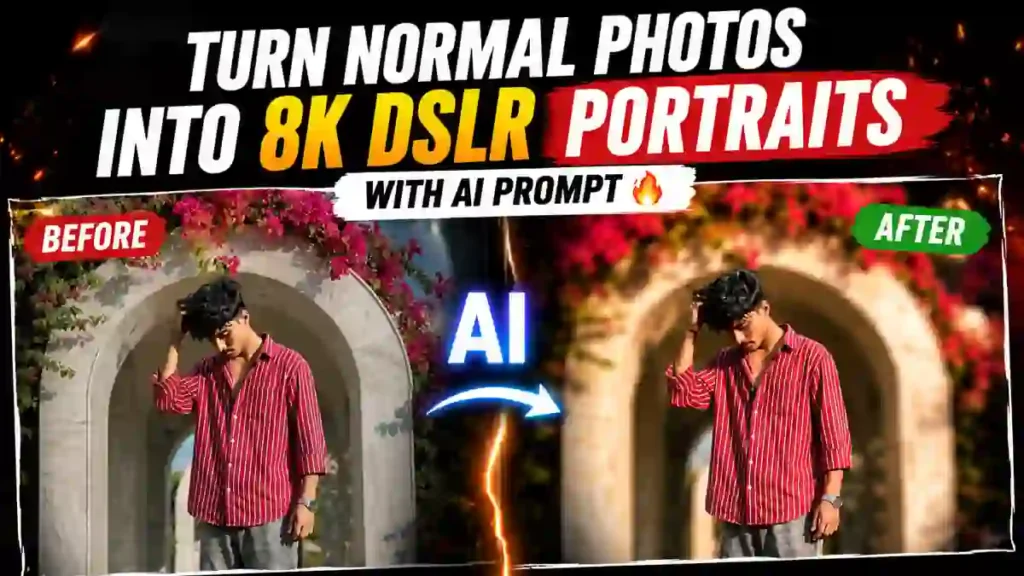
Use the uploaded image as the base image. Strictly preserve the original person, face, hairstyle, pose, outfit, framing, camera angle, and exact composition — 100% face match, no structural or proportional changes. Maintain the exact original aspect ratio and framing — no cropping, no zooming, no resizing, no stretching. Enhance to ultra-high resolution (8K quality) with refined micro-sharpness and realistic skin texture detail. Keep natural daylight exposure — do NOT darken the image. Preserve original brightness, white balance, and color accuracy. Apply a strong professional DSLR shallow depth of field effect (simulating f/1.2–f/1.4 aperture). Create very strong, creamy, smooth background bokeh with heavy optical lens blur. Background must be significantly blurred while the subject remains tack sharp. Ensure clear subject separation with natural depth falloff. Blur intensity should be high and clearly noticeable, but edges of the subject must remain clean and unaffected. Maintain natural lighting, soft highlights, balanced contrast (no heavy contrast), realistic skin tones with subtle glow, clean color grading, and natural exposure. Avoid dark cinematic tones. Ultra-realistic, photorealistic, extremely detailed, strong background blur, subject razor sharp, no new elements, no pose change, no object removal, no text, no watermark.
“Do NOT darken the image” is the single most important line in this prompt. Without it, ChatGPT consistently pushes portrait edits toward dark cinematic tones — your bright daylight photo comes out looking like a moody film still. This one instruction prevents that.
The aperture specification — f/1.2 to f/1.4 — forces the AI to produce strong, realistic optical blur rather than a generic software blur effect. The difference in output quality is immediately visible.
Prompt 3 — Phone Swap (Replace Phone in Photo)
What This Prompt Creates
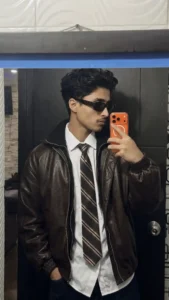
This prompt replaces the phone in your original photo with any reference phone you provide — matching the position, angle, lighting, and hand grip exactly. The result looks like a real photograph, not an edited one. Popular for content creators, unboxing posts, and brand collaborations.
8k Prompt
Replace only the phone in the original image with the phone from the provided reference image.Keep everything else exactly the same — person, face, hands, background, lighting, shadows, reflections, camera angle, framing, and image quality.Match the new phone’s position, scale, orientation, and perspective perfectly to the original.Ensure realistic lighting, natural shadows, and accurate reflections so the phone blends seamlessly into the scene.Do not alter hand position, grip, or finger placement — the phone must fit naturally within the existing pose.Final result must look completely real, with no AI artifacts, distortions, or editing traces.
“Do not alter hand position, grip, or finger placement” is the critical line. Without it, AI repositions the hands to fit the new phone shape — and the result immediately looks edited. Locking the hand position forces the AI to fit the phone to the existing grip rather than the other way around.
Specifying “accurate reflections” is equally important — phone screens and frames create light reflections based on the environment. If the AI skips this, the phone looks like a flat sticker pasted onto the image.
Prompt 4 — Outfit Swap (Replace Clothing in Photo)
What This Prompt Creates
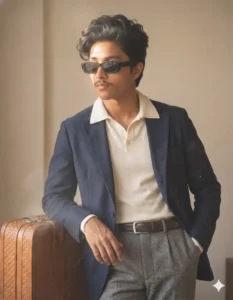
This prompt replaces the outfit of the person in your photo with any reference outfit you provide — keeping the face, body structure, pose, background, and lighting completely unchanged. It looks like the person was always wearing that outfit.
Outfit Replace Prompt
Replace the outfit of the person in the image with the reference outfit, Keep the original face, hair, body structure, pose, background, lighting, shadows, and camera perspective exactly the same. Ensure the new outfit fits naturally on the body with correct proportions, realistic fabric folds, and accurate texture details. Match lighting direction and color tones perfectly so the outfit blends seamlessly into the scene. Preserve depth, wrinkles, and natural cloth behavior. Do not alter facial features or environment. Output should look like a real photograph, not AI-generated.
“Realistic fabric folds” and “natural cloth behavior” are the two lines that most basic outfit swap prompts skip — and that is exactly why most results look fake. Clothing folds differently depending on body position, fabric type, and lighting direction. Specifying this forces the AI to render the outfit as if it physically exists on the body rather than floating on top of it.
“Output should look like a real photograph, not AI-generated” is a direct anti-artifact instruction — it pushes the model toward photorealism and away from the slightly plastic, over-smooth finish that AI images tend to have by default.
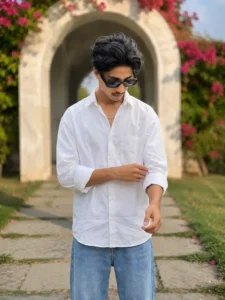
This prompt removes your original background and replaces it with any reference background you provide — matching the lighting, perspective, color grading, and shadows so the subject looks like they were physically standing in the new location.
Background Replace Prompt
Replace the subject’s background with the provided background image. Keep the subject EXACTLY unchanged — face, skin tone, features, beard, hair, body, clothing, expression. Remove the original background cleanly with precise edges — no blur, no halo, no rough cut. Match scale and perspective naturally. Adjust lighting direction, intensity, and temperature to fit the background. Add realistic shadows and subtle light spill. Match color grading, contrast, brightness, and white balance. Maintain natural depth of field. Final result must be ultra-realistic, with no visible cutout or edited look — as if originally shot in that background.
“No halo, no rough cut” directly addresses the most common background swap failure. When AI removes a background, it often leaves a faint glow or rough jagged edge around the subject — especially around hair. Naming this failure explicitly tells the AI to avoid it.
“Subtle light spill” is a professional photography term — it refers to the way background light wraps softly around the edges of a subject. Including this creates the most natural-looking integration between subject and background. Without it, the subject looks pasted into the scene rather than standing in it.
How to Use All Five Prompts in ChatGPT
Step 1 — Open ChatGPT in the correct mode
Open ChatGPT and confirm you are in GPT-4o mode with image generation enabled. Free plan users have a daily image generation limit. Paid Plus plan gives unlimited generations — worth it if you are creating content regularly.
Step 2 — Upload your photo
For Prompts 2, 3, 4, and 5 — upload your original photo first. For Prompt 3 (phone swap) and Prompt 4 (outfit swap), upload both the original photo and the reference image in the same message. For Prompt 5 (background swap), upload the original photo and the reference background together.
Step 3 — Paste the prompt exactly
Copy the prompt in full and paste it without shortening. Every line has a specific job. Removing lines removes protection against AI errors.
Step 4 — Check these things in the result
Face unchanged and accurate. Edges clean around hair and shoulders. Lighting consistent between subject and background. No visible AI artifacts or plastic skin texture. If something looks off, identify the specific problem and add one corrective instruction — do not rewrite the entire prompt.
Step 5 — Download and share
Download the result in full resolution. For Instagram Reels covers, crop to 9:16. For grid posts, 4:5 works best. For profile photo, square crop centered on face.
ChatGPT vs Gemini — Which Works Better for These Prompts
Tested all five prompts in both tools. Honest results:
ChatGPT (GPT-4o) — Stronger face preservation across all five prompts. The DSLR bokeh result was significantly better — the blur felt optically accurate rather than digital. The Korean Rose Boy portrait came out more realistic with better skin texture and rose petal detail. The outfit swap handled fabric folds more naturally.
Google Gemini— Faster generation time. Handled the background swap reasonably well for simple backgrounds. Colour grading was sometimes warmer and more vibrant, which works well for outdoor daylight photos. Edge separation around hair was occasionally less precise than ChatGPT.
Recommendation: Start every prompt in ChatGPT. If you hit the free tier daily limit, use Gemini for the background swap and phone swap prompts — those performed closest to ChatGPT quality in Gemini.
Which Photos Give the Best Results
Best input photos across all five prompts share three qualities. First, good lighting — natural daylight or soft indoor light. Second, a clear, sharp face — the AI needs detail to preserve accurately. Third, a clean, uncluttered composition — the simpler the original, the cleaner the AI output.
For the Korean Rose Boy prompt specifically, a photo with an open sky or outdoor background in the input gives the AI a starting point that matches the prompt’s sky direction. For the bokeh prompt, a photo already taken outdoors with some background depth produces the most dramatic blur result.
Avoid heavily filtered source photos, very dark or low-light images, and photos where the face is partially obstructed. The AI can only preserve what it can clearly read in the original.
Where to Use These Results
Instagram Reels Cover — The Korean Rose Boy portrait and the bokeh enhancement both work excellently as Reels cover photos. High contrast, clear subject, dramatic background — exactly what stops a thumb mid-scroll.
Instagram Grid — Background swap and outfit swap results create a consistent visual aesthetic across your grid without needing a studio photoshoot.
WhatsApp and Telegram DP — DSLR bokeh portrait is the strongest option here. Subject clarity at small display sizes is excellent.
YouTube Thumbnails — Background swap with a dramatic location creates instant visual authority. Combined with the bokeh enhancement, the face stands out sharply against any background.
LinkedIn and Professional Profiles — DSLR bokeh with natural lighting settings gives a headshot quality that would otherwise cost several thousand rupees at a professional photography studio.
Common Mistakes to Avoid
Uploading a blurry or dark source photo. These prompts enhance what exists — they cannot reconstruct a bad input image.
Shortening the prompts. Every line removes a specific failure. Shorter prompt means more AI improvisation means less predictable results.
Using both a reference outfit and a reference background in the same prompt. Each swap prompt is designed for one change at a time. Combining two reference swaps in one prompt confuses the AI and reduces output quality.
Applying heavy filters on top of the result. The output of these prompts is designed to look complete. Adding a dark Instagram filter on top of a DSLR bokeh result kills the naturalness immediately.
Not checking edges before saving. Always zoom into the hair and shoulder outline before downloading. A clean edge is the difference between a result that looks real and one that looks edited.
Frequently Asked Questions
Do these prompts work for girls too?
Yes. All five prompts are written without gender specificity — they preserve whatever is in the original uploaded photo. The Korean Rose Boy portrait can be adapted for girls by changing the outfit description and adjusting the rose style to match a feminine aesthetic.
Can I use these on the free ChatGPT plan?
The free plan includes limited image generations per day. All five prompts work on the free plan within that limit. For consistent daily content creation, the Plus plan at twenty dollars per month removes the daily limit.
Why does my face sometimes look slightly different in the output?
This happens when the background or outfit change creates edge conflicts near the face — the AI adjusts slightly to blend the transition. Adding “100% face match, preserve original facial features exactly, no structural changes to face” to any prompt reduces this significantly.
Final Thoughts
I found these styles on Instagram Reels and went looking for the prompts behind them. What I found online was disappointing — vague instructions that gave generic results. So I used AI to help me rebuild each one properly, tested every version in ChatGPT, and kept refining until the output matched what I had seen trending. This final set of five is the result of that process.
The results from ChatGPT using these prompts were genuinely better than I expected — realistic, clean, and impressive enough that I am confident sharing them publicly. If you have been looking for prompts that actually work rather than ones that just look good on a blog post, these are the ones to try.
Pick one, upload your photo, and see what comes out. I think you will not be disappointed.
Aman Roy
Aman Roy is an AI writer at Scipuz, covering ChatGPT prompts, Google Gemini, AI tools, and viral AI trends. He personally tests AI prompts before sharing practical and easy-to-understand guides.