built this cyan blue studio screen portrait prompt myself — the concept came entirely from my own imagination. A young man seated on a dark metal folding chair in a pitch-black studio, leaning back slightly, gazing upward, while a massive glowing screen behind him displays a close-up of a woman’s eyes staring directly forward. The biggest challenge was the color grading — getting the cyan blue neon light to interact naturally with the skin, the chair, and the dark studio environment without looking artificial or oversaturated. After fixing the color grading issue, the result came out exactly as intended — moody, mysterious, cinematic, and completely unlike anything circulating on social media right now.
Why This Cyan Blue Studio Portrait Style Is Trending
Dark studio portraits with dramatic colored lighting are among the most visually powerful AI photo styles on Instagram for boys in 2026. The specific combination in this prompt — pitch-black environment, intense cyan blue light, a glowing rectangular screen displaying someone’s eyes, cinematic rim lighting — creates a visual that feels simultaneously futuristic and deeply emotional.
What makes this concept specifically unique is the screen element. Most dark studio AI portraits feature a single colored light source — a neon sign, a window, or a lamp. This prompt adds a narrative layer — a large glowing screen displaying a close-up of a woman’s eyes behind the seated subject. The juxtaposition between the man gazing upward and the eyes on the screen staring directly forward creates an immediate visual tension that makes viewers stop and look twice.
The cyan blue color choice is deliberate — it is the most cinematic of all neon colors for dark studio photography. It creates the coldest, most atmospheric, and most technically beautiful rim lighting effect when it interacts with skin tones and dark clothing in a black environment.
How to Create Your Cyan Blue Studio AI Photo Using ChatGPT
Step 1 — Open ChatGPT
Open ChatGPT at chatgpt.com — confirm you are in GPT-4o mode with image generation enabled. Free plan works with daily limits.
Step 2 — Upload Your Photo
Upload a clear, well-lit photo of yourself — face clearly visible, sharp focus. The prompt creates a completely new dark studio scene around your uploaded reference — a natural, unfiltered input photo produces the most accurate face preservation in the dramatic lighting environment.
Step 3 — Copy the Prompt
Click the Copy Prompt button below — the full prompt copies to clipboard instantly.
Step 4 — Paste and Send
Paste the prompt in the same message as your uploaded photo. Hit send.
Step 5 — Check the Result
Verify the cyan blue color grading looks natural — not oversaturated or artificially blue. Check that the glowing screen behind you displays the close-up eyes correctly. Confirm the rim lighting creates genuine edge illumination on your hair and shoulders without washing out the dark studio environment.
Step 6 — Download and Post
Download using ChatGPT’s download button. Post on Instagram with #CinematicPortrait #NeonPortrait #DarkAesthetic for maximum reach.
The Cyan Blue Studio Screen Portrait Prompt — Copy and Paste Ready
What This Prompt Creates
A young man with dark curly hair seated on a dark metal folding chair in a pitch-black studio space, leaning back slightly and gazing upward. Behind him — a large horizontal glowing rectangular screen displays a close-up, high-detail shot of a woman’s brown eyes staring directly forward. Moody atmosphere illuminated primarily by intense cyan blue light, electric neon glowing screen edges, deep shadows, cinematic rim lighting. 8K resolution, photorealistic, dramatic composition, vertical 9:16 aspect ratio.
Why This Prompt Works
The color grading fix was the most critical refinement in building this prompt. The original version produced cyan blue lighting that was too saturated — the skin tones went cold and unnatural, the black studio background shifted toward an electric blue that looked digital rather than cinematic. The fix was keeping the lighting description precise — “intense cyan blue light” without adding additional color temperature modifiers that conflicted with the natural skin tone requirement.
The “large horizontal glowing rectangular screen” behind the subject is the most compositionally powerful element in this prompt. It creates a background that is simultaneously a light source and a narrative element — the glowing screen edges produce natural rim light spillage on the subject while the close-up eyes on the screen create a secondary focal point that adds visual depth and story to the composition.
The “gazing upward” pose — combined with the eyes on the screen staring directly forward — creates a deliberate compositional contrast. The subject looks up, the screen eyes look out. That tension between two different gazes in the same frame is what makes this portrait feel like a scene from a story rather than a standard dark studio portrait.
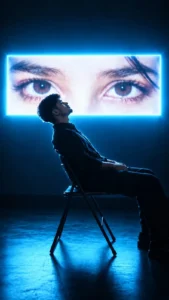
[PROMPT BOX]
Use uploaded photo as face reference — preserve exact face, skin tone, hair, and features with 100% accuracy. A young man with dark, curly hair seated on a dark metal folding chair in a pitch-black studio space, leaning back slightly and gazing upward. Behind him, a large horizontal glowing rectangular screen displays a close-up, high-detail shot of a woman’s brown eyes staring directly forward. Moody atmosphere illuminated primarily by intense cyan blue light, electric neon glowing screen edges, deep shadows, cinematic rim lighting, 8K resolution, photorealistic, dramatic composition, vertical 9:16 aspect ratio.
The Color Grading Problem — And How It Was Fixed
The biggest challenge in building this prompt was the cyan blue color grading. Three specific problems appeared in the rejected versions before arriving at the final prompt.
Problem 1 — Oversaturated Cyan
Early versions produced a cyan blue that was too electric and saturated — it looked like a digital color filter applied on top of a photo rather than a real light source illuminating a real environment. The fix was removing any saturation or intensity modifiers from the color description — “intense cyan blue light” without “electric blue,” “vivid,” or “saturated” produces a more natural, physically accurate colored light effect.
Problem 2 — Cold Skin Tones
Cyan light in a dark studio naturally pushes skin tones cold — but early versions were pushing too far, making the skin look grey and unnatural. The “photorealistic” and “8K resolution” specifications at the end of the prompt force ChatGPT to maintain realistic skin tone rendering even under strong colored lighting — which produces the correct balance between the cyan atmosphere and natural skin warmth.
Problem 3 — Screen Brightness Overwhelming the Subject
Early versions produced a screen that was too bright — the glowing rectangular display was washing out the subject rather than illuminating him from behind. The “electric neon glowing screen edges” instruction focuses the screen’s light contribution on its edges rather than its full surface area — which produces a more natural rim light effect and keeps the subject as the primary focal point rather than the screen.
Why This Concept Is Completely Original
Most dark studio AI portraits on social media in 2026 follow three standard formulas — red light moody portrait, blue hour silhouette, or neon sign background. This prompt breaks all three formulas with a concept that has no direct equivalent in the current AI photo trend cycle.
The seated-on-a-folding-chair composition is deliberately unglamorous — a simple dark metal chair rather than a throne, a luxury sofa, or a studio backdrop. That everyday object in an extraordinary environment creates the visual tension that makes this style feel authentic rather than staged.
The screen displaying a woman’s eyes is the most narratively rich element — it implies a story without stating it. Who is she? Why is her close-up on the screen? Why is the man looking upward rather than at the screen? These unanswered questions are exactly what drives saves and shares — viewers engage because the image makes them want to know more.
ChatGPT vs Gemini
Tested both tools. ChatGPT produced significantly better results — the cyan blue color grading was more natural and physically accurate, the screen glow created more convincing rim lighting on the subject, and the pitch-black studio environment maintained genuine depth without shifting toward digital blue. Gemini produced a decent dark studio atmosphere but the color grading went too electric and the screen element was less precisely rendered. Use ChatGPT for this prompt.
Where to Post Your Cyan Blue Studio Portrait
Instagram Grid — This portrait is built for the Instagram grid. The vertical 9:16 format, the dramatic dark background, and the cyan blue lighting create an immediate visual statement that anchors any grid aesthetic. It stands out in any feed because it looks nothing like standard portrait photography.
Instagram Profile Picture — The moody, cinematic quality and the slightly upward gaze create one of the most distinctive and memorable profile pictures for boys currently available through AI photo prompts.
Instagram Reels Cover — A dark cyan studio portrait as a Reels cover communicates a specific cinematic aesthetic and emotional tone that attracts viewers who respond to moody, atmospheric visual content.
Pinterest — Dark studio portrait photography with dramatic colored lighting performs consistently well on Pinterest as aesthetic and photography inspiration content.
Common Mistakes to Avoid
Uploading a dark or moody input photo. The prompt creates a pitch-black studio environment — if your input photo is already dark or dramatically lit, the AI struggles to separate your face reference from the desired output lighting. Upload a well-lit, natural photo for the clearest face reference.
Adding extra color descriptions. “Cyan blue” is precise — adding “electric,” “vivid,” “neon,” or “saturated” pushes the color toward the oversaturated problem that the original versions had. Keep the color description as “intense cyan blue light” and nothing more.
Removing the “photorealistic” and “8K resolution” specifications. These two instructions at the end of the prompt are what force ChatGPT to maintain realistic rendering standards — without them, the output drifts toward a more stylized, digital aesthetic that loses the cinematic quality.