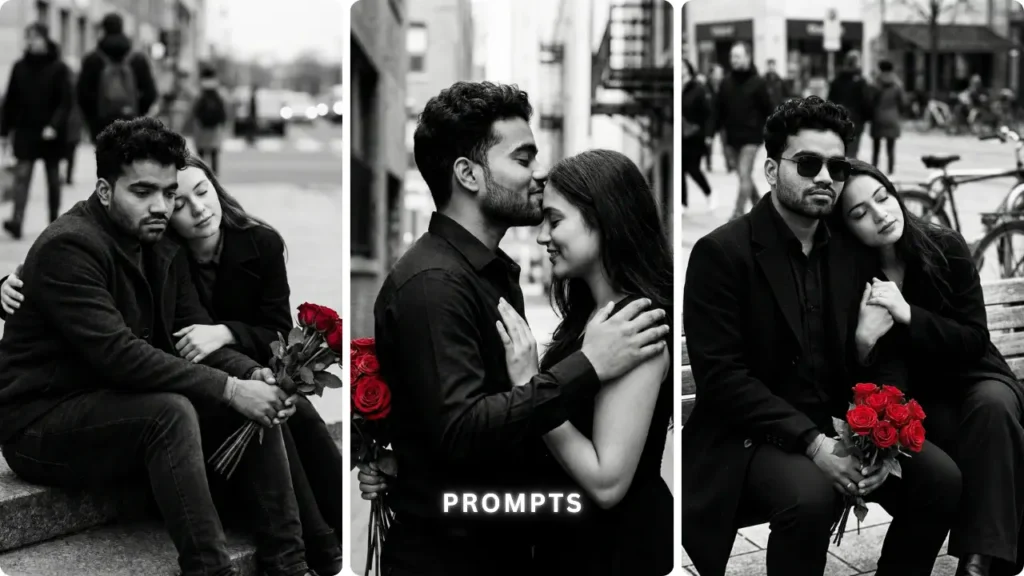
I tested more than 15 couple photo prompts in ChatGPT before landing on these five. The ones circulating on social media looked good in screenshots but the actual output had serious problems — colour grading was off, skin tones looked plastic, and the faces never matched the uploaded reference accurately. I identified exactly what was causing each problem, fixed the logic, and rebuilt the prompts one by one. These five are the final versions after all that testing — three refined from social media and two built from scratch. The results were genuinely realistic, warm, and Instagram-ready.
Why Most Couple Photo Prompts Fail — And What These Fix
The most common failure in couple AI photo prompts is not the concept — it is the missing technical instructions. When you tell ChatGPT “create a romantic couple photo,” it fills in every blank with its own interpretation. Faces change. Skin tones shift. Colour grading goes either too dark or too saturated. The couple ends up looking like stock photo models rather than the two people in the uploaded images.
Every prompt in this list includes three layers that most prompts skip entirely. First, a strict identity lock — explicit instructions that preserve exact faces, skin tones, and natural skin texture without smoothing. Second, specific lighting logic — warm golden hour, soft fill flash, or dreamy diffusion glow depending on the style. Third, negative prompts — direct instructions telling ChatGPT what not to do, which is equally important as telling it what to create.
These three layers are what make the output look realistic rather than artificially generated.
How to Create Your Couple AI Photo — Simple Steps
Step 1 — Open ChatGPT
Open ChatGPT at chatgpt.com on mobile or desktop. Make sure you are in GPT-4o mode with image generation enabled. Both free and paid plans work — free plan has daily generation limits.
Step 2 — Upload Both Photos
For couple prompts, upload two photos in the same message — one of each person. Both faces should be clearly visible and well-lit. Avoid dark, blurry, or heavily filtered photos. The clearer the input, the more accurate the face preservation.
Step 3 — Copy Your Chosen Prompt
Choose the style you want from the five prompts below. Click the Copy Prompt button — the full prompt copies to your clipboard instantly.
Step 4 — Paste and Personalise
Paste the prompt in the same message as your uploaded photos. If the prompt has customisable fields — like outfit color or quote text — edit those before sending.
Step 5 — Send and Generate
Hit send. ChatGPT typically takes 15 to 30 seconds. Check the result — face accuracy, skin tone, lighting, and overall mood.
Step 6 — Download and Post
Download in full resolution. For Instagram — 4:5 or 3:4 crop. For WhatsApp DP — square crop. For Reels cover — 9:16.
5 Best ChatGPT Couple Photo Prompts — Realistic, Copy and Paste Ready
Prompt 1 — Dreamy Romantic Collage (Traditional Outfits)
What This Prompt Creates
A warm cinematic collage of 4 to 5 layered frames — close-up portraits, candid smiling moments, intimate eye contact — couple in deep red traditional outfits with golden hour lighting. The scrapbook overlap style makes this instantly shareable on Instagram and perfect as a WhatsApp DP.
Why This Prompt Works
The “strict identity lock” section at the top — “100% same faces, no reshaping, preserve exact features, natural visible skin texture” — is the most important part. Without this, ChatGPT subtly idealises both faces. The negative prompt at the bottom — “face alteration, plastic skin, over-smoothing” — reinforces the same instruction from the opposite direction. Together, these two elements are what make the faces in the output actually look like the people in the uploaded photos.
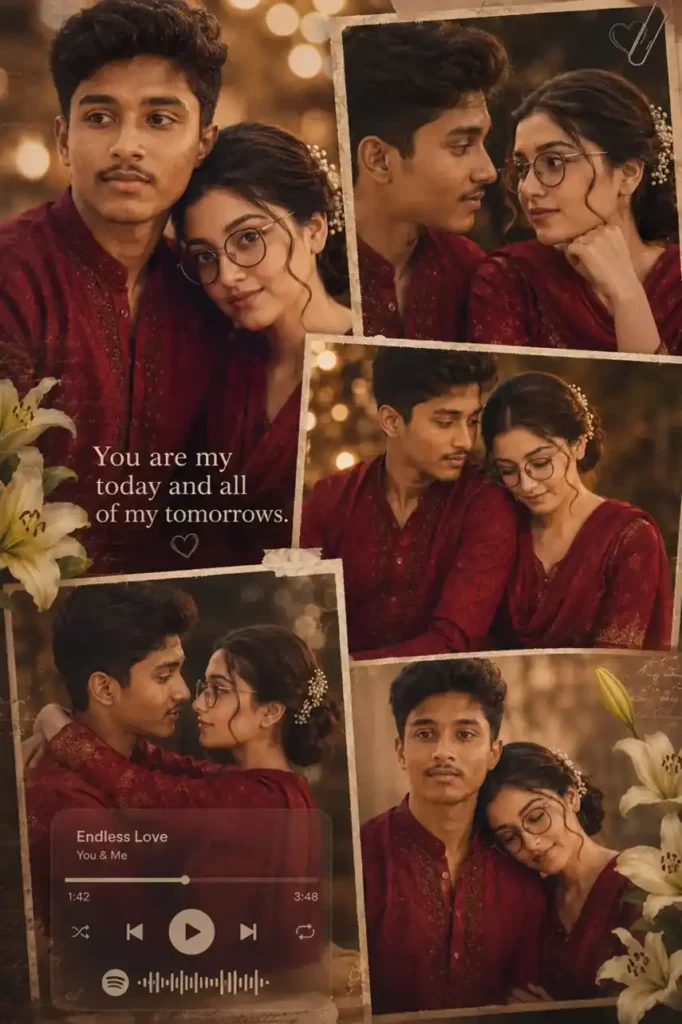
Create a dreamy romantic couple collage, Ultra HD 4K, vertical 3:4 or 4:5, cinematic Instagram aesthetic.Use uploaded image(s) as the ONLY face reference. Strict identity lock: • 100% same faces • no reshaping or smoothing • preserve exact features, skin tone, expressions • natural visible skin texture4–5 layered collage frames with soft scrapbook overlap: • close-up romantic portraits • candid smiling moments • intimate eye-contact poses • mid-shot couple frameCouple wearing elegant deep red traditional outfits with realistic fabric texture.Warm golden-hour cinematic lighting, soft glow, dreamy cozy vintage romantic mood.Soft blurred bokeh background with minimal lilies and subtle handwritten textures.Optional semi-transparent music player overlay with quote: “You are my today and all of my tomorrows.”Sharp focus on faces, soft background blur, subtle bloom, light film grain, gentle vignette, clean blending.Style: dreamy cinematic romantic collage, warm and Instagram-ready.Negative prompt: face alteration, identity mismatch, plastic skin, over-smoothing, cluttered layout, harsh lighting, unrealistic colors.
Prompt 2 — Soft Window Light Couple Portrait (Saree Style)
What This Prompt Creates
A dreamy high-key indoor portrait — couple seated in a traditional window alcove with curved arch, warm airy tones, soft flash fill, and a genuinely candid intimate mood. Female in pastel floral saree, male in maroon shirt. The soft diffusion glow and shallow depth of field make this feel like a real professional couple shoot.
Why This Prompt Works
“Soft flash fill eliminating harsh shadows” is the technical instruction that most basic prompts skip. Indoor lighting in AI images almost always produces one of two problems — either too dark with heavy shadows, or too bright with blown highlights. Specifying flash fill combined with “lifted whites and soft highlight bloom” tells ChatGPT exactly how to balance the light. The result is that clean, airy, high-key look that performs best on Instagram for couple content.
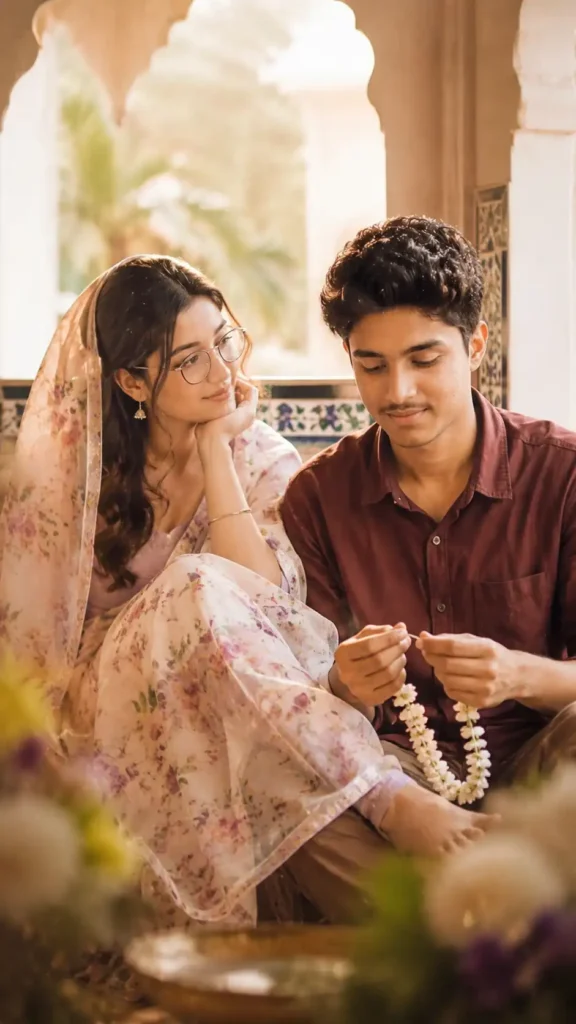
Dreamy high-key couple portrait with soft flash fill eliminating harsh shadows, warm airy tones, lifted whites, soft bloom, creamy diffusion glow, slight grain, shallow depth of field (35-50mm), subtle halation. Scene in a traditional window alcove with curved arch and tiled wall detail. 9:16 vertical, medium shot, slightly off-center with soft foreground blur. Female left: seated sideways, pastel floral saree, lavender blouse, half hijab, hair flowing, small earrings, relaxed pose with one leg on his lap, smiling softly at him. Male right: maroon shirt, short hair, slight stubble, seated lower, head tilted down, gently smiling while looking at jasmine garland in his hands, soft even lighting, intimate candid mood.
Prompt 3 — Rajputi Poshak Romantic Lift Scene
What This Prompt Creates
A cinematic royal Rajasthani couple scene — female in mustard yellow Rajputi poshak with detailed gota-patti embroidery, being lifted by the male partner in a maroon shirt. Dramatic, emotional, and visually striking — the kind of image that stops scrolling immediately.
Why This Prompt Works
The fabric description — “intricately embroidered mustard yellow Rajputi poshak with detailed gota-patti work, perfectly draped natural fabric folds” — is where most similar prompts are too vague. Saying just “traditional outfit” gives the AI full creative freedom which usually produces a generic result. Specifying the exact embroidery style, fabric behavior, and drape forces the AI to render authentic Indian ethnic wear rather than a generic ethnic costume.
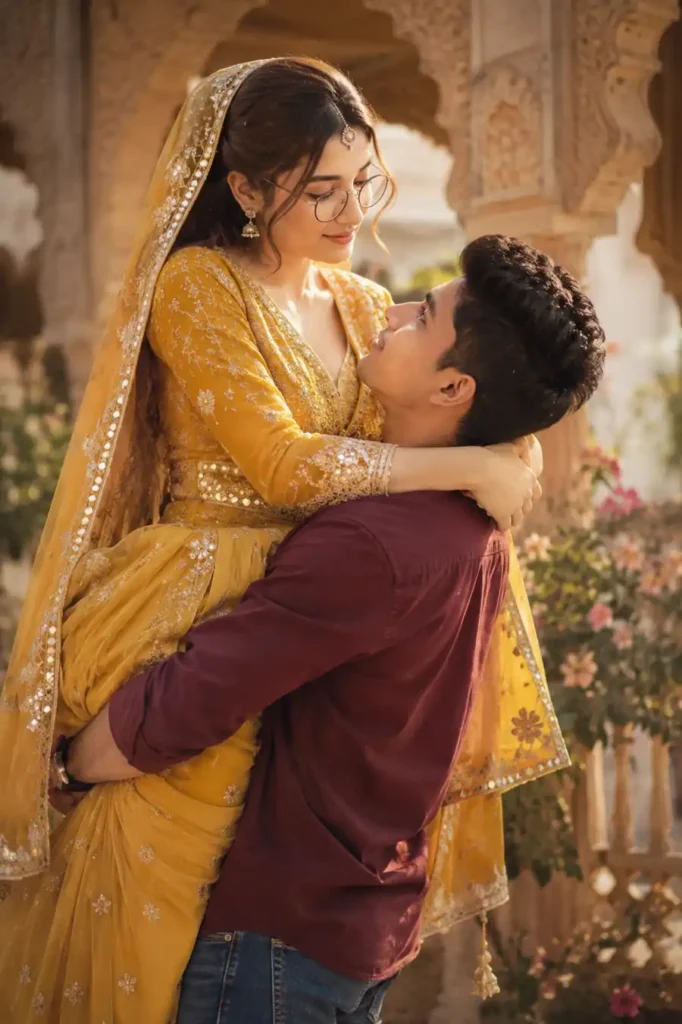
High-impact cinematic depiction of [YOUR NAME], featuring delicate facial features, a gentle smile, and soft expressive eyes, dressed in an intricately embroidered mustard yellow Rajputi poshak with detailed gota-patti work, featuring perfectly draped natural fabric folds. [YOUR NAME] is being lifted by [PARTNER NAME], who is dressed in a maroon button-down shirt and blue jeans. Use uploaded photos as face reference — 100% face match, preserve original features exactly, no structural changes.
Note: Replace [YOUR NAME] and [PARTNER NAME] with actual names before sending.
Prompt 4 — Watercolor Couple Portrait (Clean White Aesthetic)
What This Prompt Creates
A soft watercolor-style romantic portrait — couple in white outfit with pink dupatta, pink floral splashes and green leaves on a clean white background, paint splatter effect. Dreamy, artistic, and completely different from the standard realistic photo style. This aesthetic performs extremely well as an Instagram grid post and saves well on Pinterest.
Why This Prompt Works
This prompt solves a problem that most watercolor AI prompts have — the result looks like a filter applied over a photo rather than an actual watercolor painting. The combination of “paint splatter effect,” “soft glowing skin,” and “no text” keeps the output clean and genuinely artistic. The white background instruction ensures the result works as a standalone image without a busy environment competing with the subject.
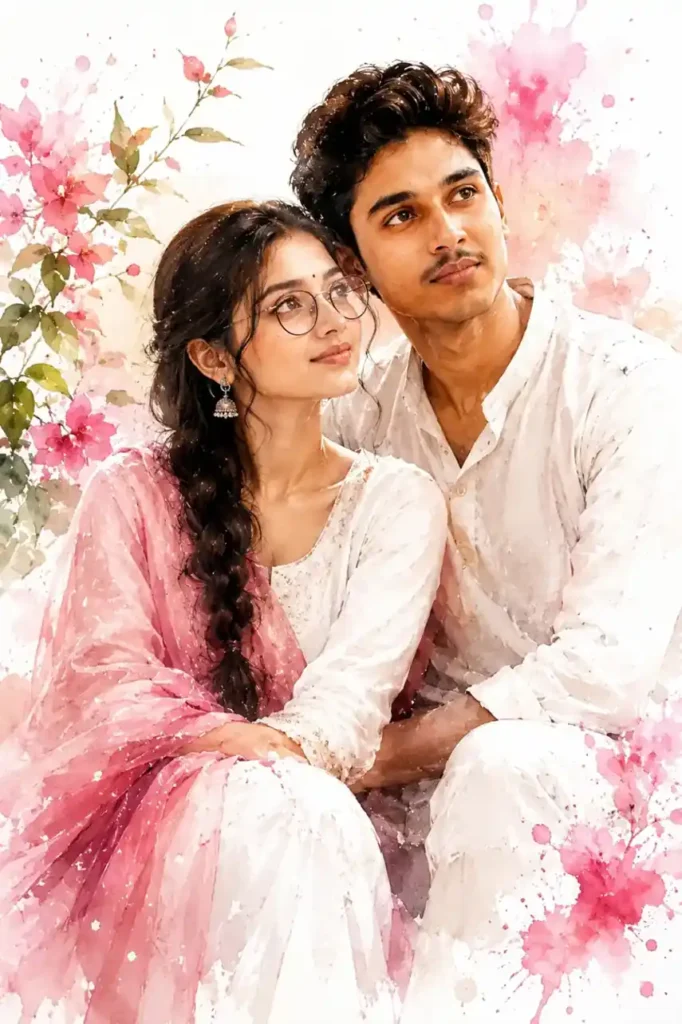
Watercolor-style portrait of a young Indian couple sitting gracefully in a white outfit with a pink dupatta, loose braid, small bindi, jhumka earrings. Calm expression, looking slightly upward, soft glowing skin. Pink floral splashes and green leaves on a clean white background, paint splatter effect, soft lighting, dreamy, high detail, no text.
Prompt 5 — Café Selfie Collage (Casual Romantic Style)
What This Prompt Creates
A warm three-frame vertical selfie collage — couple at a cozy café, coffee cups visible, casual stylish outfits, natural expressions across all three frames. This style is the most widely shared couple AI photo format on Indian Instagram right now — it looks genuinely candid rather than posed, which is exactly why it performs so well.
Why This Prompt Works
“Natural micro-expressions” and “authentic cozy couple mood” are the two instructions that separate this prompt from generic café couple prompts. AI tends to generate exaggerated smiles and stiff poses in social settings. Specifying “micro-expressions” — the subtle, natural facial movements of real people — pushes the output toward genuinely candid-looking results. Combined with “slightly low saturation” color grading, the result looks like a real phone photo rather than an AI generation.
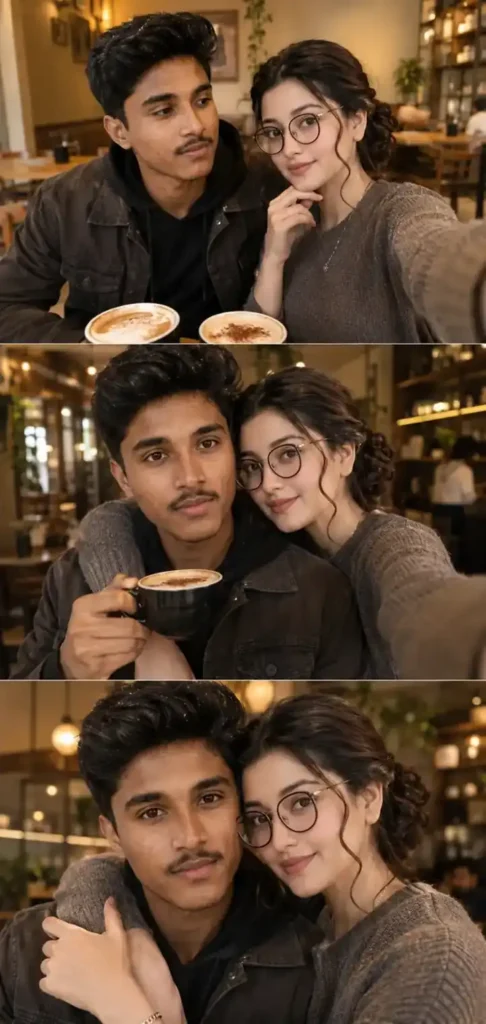
Create a vertical 3-frame selfie collage of a romantic couple at a cozy café restaurant.[1st frame] both sitting close together at a café table with coffee cups visible, taking a cute selfie, one partner smiling softly while the other looks lovingly toward them.[2nd frame] one partner holding a coffee cup while the other gently hugs from the side, both smiling naturally toward the phone camera.[3rd frame] warm close-up selfie, both leaning very close together, a sweet hug, relaxed happy expressions, cozy couple vibe.Environment: stylish café restaurant with warm ambient lighting, soft blurred background, subtle bokeh, elegant indoor décor.Outfits: casual stylish clothing, realistic textures and folds, natural coordinated colors.Style: Instagram-style romantic photography, warm tones with slightly low saturation, subtle texture, natural micro-expressions, realistic skin detail, cinematic lighting, soft shadows, authentic cozy couple mood, ultra realistic rendering.
The Problem I Kept Hitting — And How I Fixed It
When I first tested couple prompts, the biggest consistent failure was colour grading. The output would come out either too cool and desaturated — looking like a grey filter was applied — or too warm and oversaturated — looking like a badly edited Instagram photo from 2015. Neither looked realistic.
The fix was adding specific colour grading instructions to every prompt rather than leaving it to the AI. “Warm tones with slightly low saturation” for the café style. “Golden-hour cinematic lighting with soft glow” for the collage. “Lifted whites with soft highlight bloom” for the window portrait. Each style needed its own colour logic — and once that was specified, the output matched what I actually wanted.
The second consistent problem was face accuracy. ChatGPT tends to “improve” faces — smoothing skin, sharpening jawlines, adjusting proportions. For couple photos this is especially noticeable because two faces means two opportunities for the AI to make changes. The strict identity lock instructions in these prompts — and the negative prompts explicitly saying “no reshaping, no over-smoothing, no plastic skin” — solved this almost completely.
ChatGPT vs Gemini — Which Works Better for Couple Prompts
Tested all five prompts in both tools.
ChatGPT with GPT-4o gave significantly better face preservation for two-person photos. The identity lock instructions were more accurately followed — both faces stayed closer to the uploaded references. The colour grading and lighting instructions were also more precisely rendered — the golden hour warmth and the high-key flash fill both came out more naturally in ChatGPT.
Gemini 3.5 flash handled the watercolour style prompt well — the artistic rendering and paint splatter effect came out clean and genuinely artistic. But for realistic photographic styles — the collage, the café selfie, the window portrait — ChatGPT produced more convincing results.
Recommendation: Use ChatGPT for all five prompts. If you are specifically creating the watercolor style, Gemini is a solid alternative.
Can I use these prompts if I am single — without a partner’s photo?
Yes. Upload only your own photo and add “generate a realistic partner beside me — natural appearance, complementary style, same age range” to any prompt. ChatGPT will generate a companion figure. The result works well for creative content even without a real partner’s photo.
Which prompt gives the most realistic result?
Prompt 2 — the soft window light portrait — consistently gives the most photorealistic result because the high-key flash fill and shallow depth of field instructions produce an output that looks genuinely like a professional photograph rather than an AI generation.
Do these work on the free ChatGPT plan?
Yes. GPT-4o image generation is available on the free plan with daily generation limits. All five prompts work within those limits.
Final Thoughts
I tested more than 15 couple photo prompts before arriving at these five. The ones I found online had consistent problems — wrong colour grading, plastic-looking skin, faces that drifted from the uploaded references. I fixed each problem systematically — adding identity lock instructions, specific lighting logic, and negative prompts — until every output matched what I actually wanted. These five are the result of that process.
If you have been looking for couple AI photo prompts that actually produce realistic, warm, and genuinely shareable results — these are the ones worth trying. Pick the style that fits your aesthetic, upload your photos, and generate.