I came across silhouette-style AI photo edits on social media — but the ones circulating were average at best. The pose would shift, the background would change completely, or the glowing effect looked cartoonish rather than cinematic. I built these two prompts from scratch to fix exactly those problems. The first prompt transforms your uploaded photo into a glowing white silhouette with golden light trails and aura glow while preserving your exact pose, background, and environment. The second creates a cinematic moonlit sea portrait — your entire figure as a deep black silhouette against a vast navy sky, massive cumulus clouds, and a glowing moon. Both results came out exactly as intended — premium, cinematic, and genuinely different from anything else trending right now.
Why Silhouette AI Photo Edits Are Trending in 2026
Silhouette-style photography has always been one of the most emotionally powerful visual styles — the human form reduced to its essential outline, defined only by light and shadow. In 2026, AI tools like ChatGPT have made this style accessible to everyone with a smartphone and a photo.
What makes these two prompts specifically powerful is that they approach the silhouette concept from opposite directions. The first prompt transforms only the subject into a glowing white light silhouette while preserving the original background completely unchanged — creating a surreal contrast between the glowing figure and the real-world environment. The second prompt creates a full cinematic scene from scratch — a moonlit seascape with the subject as a black silhouette against a dramatic sky.
Both styles are currently performing extremely well on Instagram as profile pictures, Reels covers, and grid posts — the visual distinctiveness of silhouette edits means they stop scrolling immediately in any feed.
How to Create Your Silhouette AI Photo Using ChatGPT
Step 1 — Open ChatGPT
Open ChatGPT at chatgpt.com — confirm you are in GPT-4o mode with image generation enabled. Free plan works with daily limits.
Step 2 — Upload Your Photo
For Prompt 1 — upload any clear photo of yourself in any environment — indoors, outdoors, urban, nature. The more interesting your background, the more striking the glowing silhouette contrast will be.
Step 3 — Copy Your Chosen Prompt
Choose Prompt 1 — the glowing silhouette — or Prompt 2 — the moonlit sea cinematic portrait. Click Copy Prompt.
Step 4 — Paste and Send
Paste the prompt in the same message as your uploaded photo. Hit send.
Step 5 — Check the Result
For Prompt 1 — verify the background is completely unchanged and only the subject has transformed into a glowing white silhouette. For Prompt 2 — check the moon position, cloud detail, ocean surface, and silhouette outline quality.
Prompt 1 — Glowing White Silhouette With Golden Aura
What This Prompt Creates
Your uploaded photo — completely unchanged background, pose, proportions, lighting, shadows, composition, and environment — but with the subject transformed into a glowing white human silhouette with smooth edges, soft golden light trails, and a subtle aura glow. The cinematic background enhancement adds soft directional light, warm highlights, cool shadows, deeper contrast, expanded dynamic range, natural textures, subtle film grain, and premium 4K realism — making the real-world background look more cinematic while the glowing silhouette figure stands at the center.
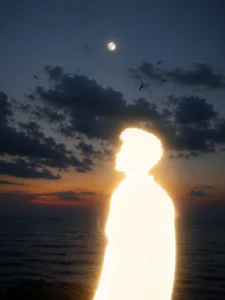
Transform only the subject into a glowing white human silhouette with smooth edges, no facial details, soft golden light trails, and a subtle aura glow. Preserve the exact pose, proportions, identity, expression, background, lighting, shadows, composition, and environment with absolutely no changes. Render in a premium cinematic editorial style as if shot on a Sony A1 with an 85mm f/1.1 GM lens at f/1.6, ISO 100, and 1/200s. Match the original lighting direction and mood while enhancing with soft directional light, warm highlights, cool shadows, deeper contrast, expanded dynamic range, natural textures, subtle film grain, and premium 4K realism. Enhance the background with a refined, naturally smoother cinematic look by reducing visual harshness, digital noise, and distracting micro-details while preserving all original scenery, depth, perspective, textures, and realism. Apply gentle atmospheric depth, soft optical rendering, and realistic lens separation to create a clean, premium, high-end photographic background without making it look artificial, over-blurred, painted, or AI-generated. Maintain the original scene exactly, with improved depth, clarity, and cinematic quality.
Prompt 2 — Cinematic Moonlit Sea Silhouette Portrait
What This Prompt Creates
An ultra-realistic cinematic twilight portrait — you as a deep black silhouette standing alone by the sea in a 4:5 vertical composition, positioned slightly right of center in a clean left-side profile, facing toward a glowing nearly full moon. Quiff-style tousled mid-length black hair with messy strands lifting in the breeze. Ocean stretching across the lower frame with calm water and barely visible ripples. A vast deep navy-blue dusk sky with massive soft cumulus clouds illuminated by moonlight. Distant birds as tiny black silhouettes across the sky. Faint warm lavender and orange twilight gradient at the horizon. Natural moonlight only, high dynamic range, moody contrast, subtle film grain, 8K masterpiece quality.
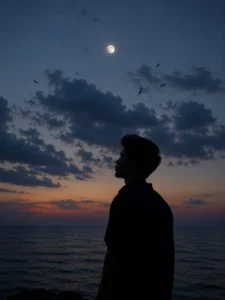
Create an ultra-realistic cinematic twilight portrait of a young man standing alone by the sea, captured in a vertical 4:5 composition. The subject is positioned slightly right of center, shown in a clean left-side profile, facing toward the glowing moon in the sky. His entire body appears as a deep black silhouette with no visible facial details except for the recognizable outline of his features. Hairstyle: quiff-style tousled mid-length black hair with naturally messy strands lifting slightly in the breeze, creating a soft, textured silhouette. Facial Hair: light, neatly groomed mustache visible only through the side-profile outline. Body: slim build, relaxed posture, hands resting naturally by the sides. He wears a dark oversized collared shirt with the collar slightly raised, blending into the silhouette. The ocean stretches across the lower portion of the frame with calm water and barely visible ripples fading into darkness. Above him is a vast deep navy-blue dusk sky transitioning into muted blue-gray tones. A bright nearly full moon sits high above the subject, almost perfectly centered horizontally. Massive soft cumulus clouds dominate the middle of the sky, illuminated by faint moonlight, creating dramatic atmospheric depth. Several distant birds fly across the sky at different heights as tiny black silhouettes, adding motion and a peaceful cinematic mood. The horizon glows subtly with a faint warm lavender and orange twilight gradient before fading into dark blue. Lighting: natural moonlight only, low-light exposure, high dynamic range, realistic atmospheric haze, soft cloud illumination, subtle film grain, deep shadows, moody contrast. Color Palette: midnight blue, navy, charcoal black, muted gray, soft lavender, faint warm orange, cool moonlight tones. Camera: eye-level perspective, 50mm lens, shallow atmospheric depth, portrait orientation 4:5, subject occupying lower-right third, large negative space above, moon aligned near upper center, clouds filling most of background, ocean at bottom. Style: ultra-photorealistic, cinematic, melancholic, minimalist, dreamy, peaceful, premium editorial photography, natural sky colors, authentic cloud textures, realistic bird silhouettes, subtle analog film grain, HDR, 8K, masterpiece quality. Negative Prompt: no city lights, no buildings, no mountains, no extra people, no boats, no text, no logos, no artificial lighting, no fantasy elements, no exaggerated moon size, no glowing outline, no cartoon effect, no oversaturated colors, no blur on subject, no facial distortion, no AI artifacts.
ChatGPT vs Gemini for These Silhouette Prompts
Tested both tools across both prompts.
ChatGPT with GPT-4o produced better results for Prompt 1 — the glowing silhouette effect was more precisely rendered with clean smooth edges and the background preservation was more accurate. The golden light trails were more natural-looking and the aura glow was subtle rather than exaggerated.
For Prompt 2 — the moonlit sea scene — ChatGPT produced more accurate cloud textures and more realistic ocean surface rendering. The color palette instructions — midnight blue, navy, charcoal black, muted gray, soft lavender, faint warm orange — were followed more precisely in ChatGPT.
Gemini handled the atmospheric depth well in Prompt 2 but the moon size and cloud illumination were occasionally less accurate. For both prompts — ChatGPT is the clear recommendation.
Get New Viral AI Photo Prompts Before They Go Mainstream
Want the latest trending ChatGPT AI photo prompts — cinematic, silhouette, and editorial styles — before they hit mainstream social media?
Final Thoughts
I came across silhouette-style AI photo edits on social media and immediately noticed the problems — shifting poses, changed backgrounds, cartoonish glow effects. I built these two prompts from scratch to fix all three. The first prompt preserves your exact real-world environment while transforming only your figure into a glowing white cinematic silhouette. The second creates a complete moonlit sea cinematic portrait with precise atmospheric detail — sky, ocean, moon, clouds, color palette, and camera settings all specified exactly. Both results came out exactly as intended. Upload your photo, paste your chosen prompt, and create your silhouette portrait today.