I came across this Mahindra Thar sunset concept while scrolling through Instagram reels — the casual hood pose, the golden-hour coastal light, the ultra-wide 0.5x lens distortion, the budget Android phone aesthetic. The idea was strong but every version I tested initially came out looking too cinematic — too polished, too DSLR, too AI. The subject was sharp when it should have been slightly soft. The lighting was graded when it should have been raw. The sunset tones were saturated when they should have been natural. I stripped out every cinematic instruction, added explicit anti-enhancement language, and rebuilt the prompt around authentic smartphone imperfections. The result looks like a real photo a friend casually took on their phone — and that is exactly why it works on Instagram in 2026.
Why the Mahindra Thar Sunset Snapshot Style Is Going Viral
The Mahindra Thar is one of the most photographed vehicles on Indian social media — and the combination of a red Thar, a rocky coastal road, and a golden-hour sunset is a visual formula that consistently performs across Instagram, Pinterest, and YouTube Shorts. But the reason this specific prompt style is trending in 2026 is not the vehicle or the location — it is the smartphone aesthetic.
The 0.5x ultra-wide rear camera has become the defining visual signature of authentic Indian youth photography in 2026. The slight barrel distortion at the edges, the expanded field of view that makes open spaces feel larger, the natural softness at the edges of the frame — these are imperfections that every Indian smartphone user recognises instantly as real. When an AI photo captures these imperfections accurately, it stops looking like AI.
How to Create Your Mahindra Thar Sunset AI Photo Using ChatGPT
Step 1 — Open ChatGPT
Go to chatgpt.com. Confirm you are in GPT-4o mode with image generation enabled. Both free and paid plans work — free plan has daily limits.
Step 2 — Upload Your Photo
Upload any clear photo of yourself with your face visible and a natural expression. Outdoor photos work best — the prompt rebuilds the entire background and location, so the input photo is used mainly for your face, build, and general proportions. Avoid heavily filtered or dark photos.
Step 3 — Copy the Prompt
Copy the full prompt from the box below — every line matters. Do not trim or simplify. The negative instructions are as important as the positive ones.
Step 4 — Paste and Send
Paste the full prompt in the same message as your uploaded photo. Hit send. ChatGPT generates in 15 to 30 seconds.
Step 5 — Check the Result
The sunset tones should look natural and slightly soft — not saturated or graded. The 0.5x lens distortion should be visible at the frame edges. The subject should look casually posed, not styled. The overall image should look like a phone photo, not a professional shoot.
The Mahindra Thar Sunset Snapshot Prompt — Copy and Paste Ready
What This Prompt Creates
An ultra-realistic casual smartphone photograph in 3:4 ratio — a young man sitting casually on the hood of a red Mahindra Thar parked beside a rocky seaside road during golden-hour sunset, wearing a loose white oversized shirt, baggy black trousers, white sneakers with black stripes, and black rectangular sunglasses, looking toward the horizon with a relaxed expression. Shot on a budget Android phone with the 0.5x ultra-wide rear camera — authentic lens distortion, sensor noise, JPEG artifacts, slight camera shake, natural dynamic range, zero AI enhancement. Exactly like a real casual photo taken by a friend on a road trip.
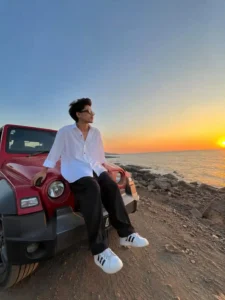
Ultra-realistic casual low-quality smartphone photograph captured with a budget Android smartphone using the 0.5× ultra-wide rear camera. Natural wide-angle perspective with authentic smartphone lens distortion, slight handheld camera shake, visible sensor noise, mild JPEG compression artifacts, realistic smartphone sharpening, soft natural dynamic range, and true-to-life colors. No Portrait Mode, No Cinematic Mode, No HDR, No AI enhancement, No beauty filter, No skin smoothing, No color grading, and absolutely no DSLR look. Recreate the exact same composition and location as the reference image. A young man sits casually on the hood of a red Mahindra Thar parked beside a rocky seaside road during golden-hour sunset. He wears a loose white button-up oversized shirt with sleeves slightly rolled, baggy black trousers, white sneakers with black stripes, black rectangular sunglasses, and a light mustache with voluminous black hair. He is looking toward the horizon with a relaxed expression, one hand resting on the hood and both legs hanging naturally over the front bumper. Keep the same wide-angle framing, same camera distance, same perspective, same vehicle position, same rocky shoreline, same calm ocean, same glowing orange sunset near the horizon, same clear blue-to-orange gradient sky, and the same dirt road leading along the coastline. Preserve the authentic casual smartphone aesthetic with natural lighting, realistic shadows, slight edge distortion from the ultra-wide lens, subtle motion imperfections, and an unedited social-media-style snapshot. The final image should look like it was casually taken by a friend on a budget Android phone using the 0.5× ultra-wide camera, with natural imperfections and low-quality smartphone realism. Ratio 3:4.
ChatGPT vs Gemini for This Prompt
Tested this prompt on both tools. ChatGPT GPT-4o produced more accurate 0.5x lens distortion — the barrel effect at the frame edges looked natural rather than digitally applied. The sensor noise and JPEG artifact rendering were also more authentic in ChatGPT — Gemini’s noise rendering sometimes looks like a deliberate grain filter rather than actual sensor noise.
Gemini produced slightly better vehicle detail — the Thar’s body panels and grill were more precisely rendered in some generations. But the overall smartphone aesthetic — the softness, the imperfections, the natural dynamic range — was more convincing in ChatGPT.
For this specific prompt: ChatGPT is the recommended tool. Use Gemini if you want to specifically test vehicle detail accuracy.
Get New Viral AI Photo Prompts Before They Go Mainstream
Want the latest trending ChatGPT AI photo prompts — candid, cinematic, and editorial styles — before they hit mainstream social media?
Final Thoughts
The Mahindra Thar sunset snapshot works because it rejects everything that makes AI photography look like AI. No enhancement. No color grading. No skin smoothing. No cinematic lighting. Just a casual 0.5x ultra-wide phone photo of a guy sitting on the hood of a red Thar at golden hour beside a rocky coastal road — with the natural imperfections that make it look real. I tested multiple versions before finding the right balance of negative instructions that prevents ChatGPT from defaulting toward its polished portrait mode. This is that version. Upload your photo, paste the prompt, post it tonight.