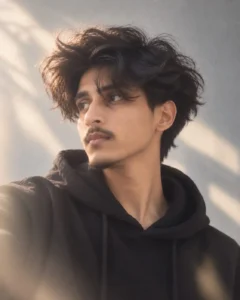
I found this moody profile portrait style on social media and immediately wanted to try it. The first result was not good — the coloring was off, the gray wall background looked artificial, and the overall image had that obvious AI-generated look rather than a genuine iPhone photo feel. I modified the prompt specifically to fix the color issue — adjusting the cool-neutral palette instructions and the natural light specifications until the output looked like something actually shot on an iPhone 16. The final result came out exactly as intended — contemplative, natural, clean, and genuinely photographic. This is the modified version — copy, paste, and create yours today.
Why This Moody Profile Portrait Style Is Trending
Clean, minimal, contemplative portrait photography is one of the most consistently performing aesthetic styles on Instagram for boys in 2026. The specific combination in this prompt — voluminous dark wavy hair partially obscuring the face, profile view looking subtly upward, black hoodie, silver chain, plain gray textured wall, diffused natural light — creates a visual that feels simultaneously editorial and genuinely personal.
What makes this style specifically popular is the mood it communicates. The slightly upward gaze, the hair falling across the face, the contemplative expression — it tells a story without words. Viewers project their own emotions onto the image, which creates the kind of deep engagement that drives saves and shares rather than just likes.
The “should not look AI-generated, should look natural like it was taken with an iPhone 16 camera” instruction is the most important creative decision in the prompt — it forces ChatGPT to prioritize photographic realism over its default AI aesthetic, which is exactly what produces a genuinely usable social media portrait.
How to Create Your Profile Portrait Using ChatGPT
Step 1 — Open ChatGPT
Open ChatGPT at chatgpt.com — confirm you are in GPT-4o mode with image generation enabled. Free plan works with daily limits.
Step 2 — Upload Your Photo
Upload a clear, well-lit photo of yourself — face clearly visible, sharp focus. A photo showing your natural hair texture gives ChatGPT more to work with for the voluminous wavy hair styling.
Step 3 — Copy the Prompt
Click the Copy Prompt button below — the full prompt copies to clipboard instantly.
Step 4 — Paste and Send
Paste the prompt in the same message as your uploaded photo. Hit send.
Step 5 — Check the Result
Verify the cool-neutral color palette looks natural — not too blue, not too warm. Check that the gray wall background has realistic texture. Confirm the hair partially obscures the face naturally and the lighting creates genuine gentle shadows and highlights.
Step 6 — Download and Post
Download using ChatGPT’s download button. Post on Instagram with #PortraitPhotography #MoodyPortrait #AIPhoto for maximum reach.
The Wavy Hair Profile Portrait Prompt — Copy and Paste Ready
What This Prompt Creates
A medium close-up profile portrait — young person with voluminous, dark, wavy shaggy hair partially obscuring their face, looking subtly upward and to the left, wearing a black hoodie and thin silver chain necklace. Plain light gray textured wall background, softly illuminated by diffused natural light creating gentle shadows and highlights that emphasize face contours and hair texture. Eye-level camera angle, realistic clean modern photographic style, cool-neutral color palette, contemplative and calm mood evoking quiet introspection. 4:5 aspect ratio. Natural iPhone 16 photography aesthetic — not AI-looking.
[PROMPT BOX]
Use uploaded photo as face reference — preserve exact face, skin tone, hair, and features with 100% accuracy. A medium close-up, profile portrait of a young person with voluminous, dark, wavy shaggy hair that partially obscures their face, looking subtly upwards and to the left, wearing a black hoodie and a thin silver chain necklace. The setting is a plain, light gray textured wall, softly illuminated by diffused, natural light that creates gentle shadows and highlights, emphasizing the contours of their face and the texture of their hair. The camera is at eye-level, capturing a realistic, clean, and modern photographic style with a cool-neutral color palette. The mood is contemplative and calm, evoking a sense of quiet introspection. Aspect Ratio: 4:5. It should not look like AI-generated, it should look natural — for a photographic image, like it was taken with an iPhone 16 camera.
ChatGPT vs Gemini
Tested both tools. ChatGPT produced better results for this specific prompt — the cool-neutral color palette was more accurately rendered and the gray wall texture looked more physically believable. The hair texture — voluminous, dark, wavy, shaggy, partially obscuring the face — was more naturally rendered in ChatGPT.
Gemini produced a decent composition but the color temperature was slightly warmer than intended and the wall background was less convincingly textured. Use ChatGPT for this prompt — the color accuracy is the most important element and ChatGPT handles it more precisely.
Final Thoughts
I found this moody profile portrait style on social media and the first result was not good — the coloring was off and it looked obviously AI-generated. I modified the prompt specifically to fix the color issue and get a genuine iPhone photography feel. The final result came out exactly as intended — contemplative, natural, clean, and photographic. Upload your photo, paste the modified prompt, and create your profile portrait today.