I tested this prompt in ChatGPT and the result was genuinely unlike anything I had seen before in AI photo editing. Most biker edits are just a portrait with a dramatic sky or a moody filter. This one is different — your actual ride data from the Wheelsafar app, projected physically onto the road beneath you, glowing in the app’s signature golden yellow, your route map forming the path under your wheels. The first time I saw the output I genuinely had to look twice to understand what was happening in the image. This prompt is for every Indian rider who uses Wheelsafar and wants to turn their ride story into something worth posting.
What Is Wheelsafar and Why Indian Bikers Use It
Wheelsafar describes itself simply: every ride is a story. The thrill of the open road, the rush of the wind, and the silent promise to make it back home. But beyond the tagline, it is one of the most thoughtfully built apps for the Indian riding community.
Wheelsafar operates through two core products — SafeSafar and LiveSafar. SafeSafar is an emergency QR tag that lives on your helmet. Scan it and rescuers instantly get your emergency contacts and medical details without needing an app. LiveSafar handles group riding with live location sharing, one-tap safety alerts for situations like breakdown or rider down, proximity-based security, and designated roles like Lead, Tail, and Marshal.
The app launched on Google Play in February 2026 and has been downloaded over 7,700 times, averaging around 110 downloads per day. Reviews consistently call it essential for long rides — the kind of app that tracks everything about your journey and gives you a record worth keeping.
That record — the route map, the distance, the stats, the path you actually rode — is exactly what this prompt takes and turns into a cinematic visual.
The Full Prompt — Copy and Paste Ready
Use this in ChatGPT with GPT-4o image mode. Upload two images together — your biker photo and your Wheelsafar ride stats screenshot — then paste this prompt.
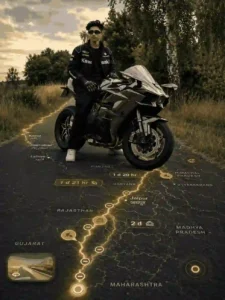
Use the provided biker photo as the ONLY human subject. Maintain identity, face, skin tone, hair,riding gear, helmet, gloves, boots, body proportions and pose EXACTLY. Do NOT beautify,stylize, or alter the biker in any way. Combine the biker photo with the provided Wheelsafar ridestats screenshot into a single cinematic composition.Read all visible ride data directly from the gmaps screenshot and reproduce the values EXACTLYas shown. Do not modify, reinterpret, approximate, or redesign any numbers, labels, route shapes,icons, or branding elements. The real Wheelsafar stats UI with the EXACT numbers andformatting from the screenshot must appear clearly embedded onto the 3D ground beneath thebiker, naturally integrated into the asphalt perspective.The stats should feel physically painted, illuminated, or projected onto the road surface withrealistic depth, reflections, texture interaction, and environmental lighting. Do NOT make the UIfloat in the air.Extract the Wheelsafar route map from the screenshot and project it onto the ground in realistic3D perspective: The route must form the main glowing road path beneath and ahead of the biker.The same route must also extend around the biker on the ground, subtly framing the ridercomposition.The route must feel physically embedded into the asphalt with realistic perspective distortion,edge glow, depth, and light spill. Never make the route holographic or floating.The route glow color must match the Wheelsafar yellow theme exactly – vibrant golden yellowwith cinematic contrast against dark asphalt. Dont change the background or anything from thephoto, just embed the stats as instructed
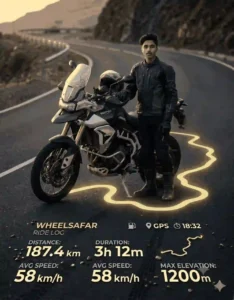
Use the provided biker photo as the ONLY human subject and preserve the biker’s identity, face, skin tone, hair, helmet, riding gear, body proportions, bike, pose, background, and lighting EXACTLY without any beautification or stylization; integrate the provided Wheelsafar ride-stats screenshot directly onto the existing road/asphalt surface with ALL numbers, labels, icons, route shapes, typography, and branding reproduced EXACTLY as shown, embedding the UI naturally into the asphalt with realistic perspective, reflections, shadows, texture interaction, depth, and cinematic lighting, while transforming the exact Wheelsafar yellow route into a glowing road path beneath and around the biker with realistic asphalt integration, subtle bloom, light spill, and ultra-realistic cinematic motorcycle photography aesthetics, ensuring nothing floats or looks holographic and the final result looks like a real premium photograph.
Why Every Line in This Prompt Is Written This Way
Maintain identity, face, skin tone, riding gear EXACTLY — do NOT beautify
This line exists because AI tools have a default tendency to improve faces — sharpen jawlines, brighten skin, adjust helmet fit. For a biker portrait, this is exactly wrong. The rider in the output should be the same person wearing the same gear as the input photo. Every detail of the riding kit — helmet scratches, glove texture, boot design — should remain unchanged. This instruction prevents the AI from making anyone look like a stock photo model instead of a real rider.
Reproduce the values EXACTLY as shown — do not modify, reinterpret, or approximate
This is the most important instruction in the entire prompt. AI has a tendency to generate plausible-looking numbers rather than reproduce exact ones. If your Wheelsafar stats show 247 km, the AI might generate 250 km because it looks cleaner. If your route has a specific turn pattern, the AI might simplify it. This line explicitly forbids that — every number, every label, every route shape must match the screenshot exactly. Your ride data is personal. It should appear exactly as you recorded it.
Physically painted, illuminated, or projected onto the road surface — do NOT float in the air
This is what separates this prompt from every basic stats overlay you have seen. Most AI-generated biker edits with data show the information floating as a semi-transparent panel in the air — like a PowerPoint slide placed over a photo. This prompt instructs the AI to embed the data physically into the road surface itself — with perspective distortion, reflections off the asphalt, and light interaction as if the numbers were painted there or projected from below. The difference in output quality is dramatic.
Route glow colour must match the Wheelsafar yellow theme exactly — vibrant golden yellow
Color consistency is what makes the composition feel intentional rather than assembled. Wheelsafar’s brand uses a specific warm golden yellow. Specifying this exact color keeps the route glow visually connected to the app UI visible in the embedded stats, creating a unified visual language across the entire image.
Never make the route holographic or floating
Without this explicit prohibition, ChatGPT defaults to a sci-fi aesthetic — glowing lines hovering in the air like something from a futuristic racing game. That looks impressive but it breaks the realism. The goal here is for the image to look like it was shot on a road where the route actually exists physically. Grounding the route in asphalt perspective achieves that.
| Step | What To Do | Details |
|---|---|---|
| Step 1 | Open ChatGPT or Gemini | Open the ChatGPT app or website (chatgpt.com) or Google Gemini (gemini.google.com). Both work on mobile and desktop. 💡 ChatGPT gives better results for most prompts on this site. |
| Step 2 | Select the Image Option | In ChatGPT, make sure you are in GPT-4o mode. Tap the image/attachment icon in the chat. In Gemini, tap the image upload icon at the bottom of the chat. |
| Step 3 | Upload Your Photo | Upload any photo where your face is clearly visible. A well-lit photo works best — avoid dark or blurry images. 💡 Outdoor photos in natural light give the best results. |
| Step 4 | Copy the Prompt | Come back to this page. Click the Copy Prompt button above and the prompt will be copied to your clipboard automatically. |
| Step 5 | Paste and Send | Paste the copied prompt into the ChatGPT or Gemini chat box. Make sure your photo is already uploaded in the same message. Then hit send. 💡 Do not shorten or edit the prompt — use it exactly as copied. |
| Step 6 | Your Image Is Ready | Wait a few seconds and your AI-edited image will be generated. Download it and share on Instagram, WhatsApp, or wherever you like. That’s it — done! |
ChatGPT vs Gemini for This Prompt
Tested both. This prompt is significantly more complex than a standard portrait edit — it requires the AI to read specific data from a screenshot and reproduce it accurately while also compositing two images into a cinematic scene.
ChatGPT with GPT-4o handled the data accuracy better. The route shape was more faithful to the original screenshot and the stats values were more precisely reproduced. The asphalt embedding also looked more physically realistic — genuine depth and light interaction rather than a flat projection.
Gemini struggled with numerical accuracy. The stats appeared but values were often slightly different from the screenshot. The route glow was also less precise in following the actual route shape. For this specific prompt, ChatGPT is the clear choice.
Which Photos Give the Best Results
Best input photos share these qualities. A photo taken outdoors on or near a road — the asphalt surface gives the AI the most natural canvas for embedding the stats. Full riding gear visible — helmet, jacket, gloves, boots — the more gear detail in the original, the more authentic the output rider looks. Good lighting — natural daylight or golden hour. Photos where your full body or at least upper body is visible work better than close-up face shots for this style.
Avoid indoor photos, photos with very dark or black floors, and photos where the ground is not visible. The stats embedding requires a readable surface beneath the subject.
One tip that makes a significant difference — use a ride stats screenshot where the route map is clearly visible and the route line has good contrast against the background. A route that is easy to read in the screenshot will be more accurately reproduced in the output.
Where to Use Your Wheelsafar Ride Portrait
Instagram Reels and Grid — A cinematic biker portrait with your real ride data glowing from the road beneath you is exactly the kind of content that performs in the Indian riding community on Instagram. It is personal, visually unique, and tells a specific story — the ride you actually did.
Wheelsafar Community Posts — Share it directly in the Wheelsafar app community. The Wheelsafar community is built around sharing routes, adventures, and riding stories. A visual that combines your stats and your portrait fits that culture perfectly.
WhatsApp Riding Groups — Every riding group has a WhatsApp chat. A cinematic ride portrait shared after a long ride gets saved and reposted. It is the kind of image people keep.
YouTube Thumbnails — If you make riding content, a biker portrait with route data embedded in the road is a thumbnail that immediately communicates what the video is about while looking visually cinematic.
Common Mistakes to Avoid
Using a low-resolution stats screenshot. The AI reads and reproduces what it can see. A blurry or small screenshot means the data values will be harder to reproduce accurately. Always use a clear, full-size screenshot.
Uploading the two images in separate messages. In GPT-4o, both images and the prompt need to go in the same message for the AI to process them as a combined task. Uploading separately causes the AI to treat them as unrelated inputs.
Expecting perfect data accuracy on the first try. This is one of the most data-precise prompts you can give an AI image generator. It will get close but may need one or two refinements. If specific numbers are off, call them out explicitly in a follow-up.
Not verifying the stats before downloading. Always zoom in and compare the output stats against your screenshot before saving and posting. Posting a ride portrait with wrong numbers defeats the entire purpose.
Does this work with any ride tracking app or only Wheelsafar?
The prompt is written specifically for Wheelsafar because it references the app’s golden yellow color scheme and UI layout. For other apps like Strava or Rever, the same structure works but you would need to adjust the color reference to match that app’s brand colors.
Can I use this prompt without a helmet on?
Yes. The prompt preserves whatever is in the original photo. If you are wearing a helmet, it stays. If you are not, it stays. The key instruction is that nothing about the biker is changed — whatever you upload is what appears in the output.
Does this work on the free ChatGPT plan?
GPT-4o image generation works on the free plan with daily limits. This prompt is complex and may use more of your daily allowance than a simple portrait edit. The Plus plan removes the daily limit if you plan to use this regularly.
Final Thoughts
I tested this prompt in ChatGPT and the output genuinely surprised me. Most biker AI edits look like a photo with a dramatic filter applied on top. This one looks like a completely different category of content — a cinematic composition where your real ride history becomes part of the visual itself. The route you rode, the stats you earned, physically embedded in the road beneath you. That combination of personal data and cinematic presentation is what makes this edit worth trying.
If you ride with Wheelsafar and you have a ride worth remembering, this is how you turn it into something worth posting.