

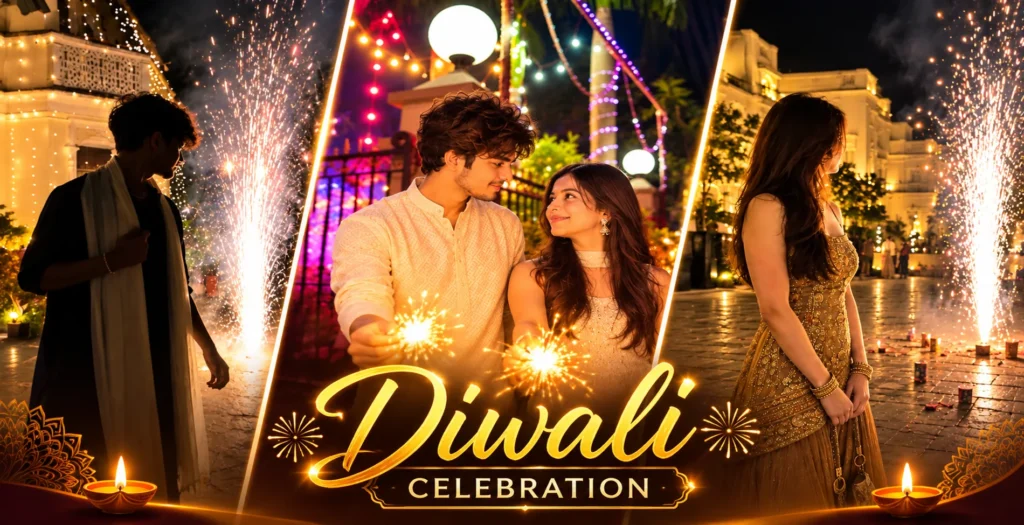
Diwali 2026 is on Sunday, 8 November 2026, and by now Instagram is full of the same flat diya selfies. These three Happy Diwali AI photo editing prompts take a different route. Each one gives you a realistic night portrait with real firework light, sparkler glow and a warm festive backdrop. They are written for ChatGPT, and every one keeps your own face. Copy a prompt, upload your photo, and post before the festival peaks.
Quick answer: Pick one prompt below, upload a clear photo of yourself (or both of you for the couple prompt) in ChatGPT, paste the prompt in the same message, and send. Regenerate once if the sparks or faces look off.
What You Get in This Article
- Prompt 1: Boy fireworks side-profile portrait
- Prompt 2: Couple sparkler portrait (boy and girl together)
- Prompt 3: Girl fireworks silhouette portrait
- Step-by-step method, tips, common mistakes and FAQ
Why These Diwali AI Photo Prompts Look More Real
Most Diwali prompts online say “a boy in a kurta with diyas”, and the result looks like a generic AI image. These prompts work differently for three reasons.
- Real light sources. The fountain firework and sparklers are the actual light in the scene. That gives you natural rim light, deep shadows and warm reflections on the ground.
- Candid poses. Side-profile, looking at the fireworks, relaxed arms. It looks like a real phone photo and not a posed AI portrait.
- Face and outfit locks. Every prompt tells ChatGPT to keep your face, skin tone and hairstyle, so the output still looks like you.
How to Create Your Diwali AI Photo in ChatGPT
- Open ChatGPT and make sure image generation is available on your account.
- Upload a sharp, well-lit photo of your face. Avoid sunglasses and heavy filters. For the couple prompt, upload one photo with both faces clearly visible.
- Copy one prompt below and paste it in the same message as your photo.
- Send it and wait about 30 seconds.
- Regenerate once or twice. The second result often has cleaner sparks and fabric detail.
- Download the image and post it on Instagram and WhatsApp Status.
Prompt 1: Boy Diwali Fireworks Candid Portrait
This is the most cinematic of the three. The subject stands in side-profile, partly in shadow, with a fountain firework exploding behind him.
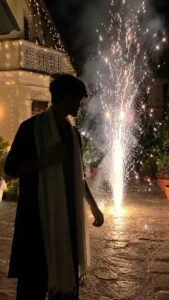
Use the uploaded photo as the strict face reference. Preserve the exact facial identity, skin tone and hairstyle. Create an ultra-realistic cinematic vertical night photograph (9:16) of a young Indian man standing outdoors during a Diwali celebration in a natural candid side-profile pose. He stands in the left foreground in a nearly full-body view, facing a brightly exploding fountain firework on his right. He has naturally tousled, voluminous black hair and a slim build. His face is partially hidden in deep shadow from strong backlighting, and his head is slightly tilted down as he watches the fireworks. One hand gently holds the scarf near his chest and the other arm hangs naturally. He wears a simple oversized black kurta with a long, lightweight ivory-white stole draped loosely around his neck, both ends hanging almost to his ankles, a subtle silver bracelet and black shoes. A large, intensely bright ground fountain firework erupts on the right, throwing hundreds of white, golden and slightly reddish sparks high into the night sky, with glowing trails, smoke clouds and falling embers. The firework backlights his hair, shoulders and scarf and lights the stone ground below with warm golden reflections. In the upper-left background is a traditional Indian heritage-style house decorated with warm-white Diwali fairy lights on its balconies, pillars and railings. The courtyard has an old irregular stone floor, and terracotta flower pots with green plants line the far right. Medium-wide full-body framing with the subject on the left half and the fireworks on the right half, camera at chest height. Authentic handheld smartphone night photography, subtle grain, natural skin and fabric texture, no HDR look, no beauty filter, no extra people, no text or watermark, 8K detail.
Why it works: The strong backlight hides part of the face, so the identity comes from your hair, profile and skin tone. The 50/50 layout (you on the left, fireworks on the right) gives a clean Instagram composition.
Prompt 2: Diwali Couple Sparkler Portrait
A romantic, candid moment lit only by sparklers, with a festive house entrance behind the couple.
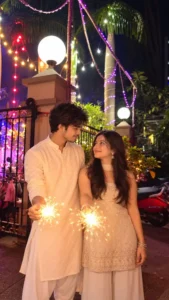
Use the uploaded couple photo as the strict face reference for both people and keep both faces 100% the same. Create a photorealistic vertical night portrait (9:16) of a young Indian couple celebrating Diwali outdoors, standing close together in the center of the frame, each holding lit sparklers. The warm sparkler glow lights both of them. The man on the left has stylish dark hair and wears a cream textured diamond-pattern kurta with white churidar, smiling as he looks at the woman. The woman on the right has long dark wavy hair and wears a sleeveless light beige embroidered short kurti with matching palazzo pants, a sheer dupatta around her neck and large traditional jhumka earrings, looking up at him with a soft smile. It is a romantic, candid moment. The background is a festive house entrance with a black metal gate, stone pillars topped with large round white globe lights, colorful red, yellow and white string lights overhead, purple fairy lights wrapped around tall palm trunks, lush green plants and a partially visible red scooter on the right, all under a dark night sky. Festive bokeh, warm cinematic tones, ultra detailed, sharp focus, eye-level medium shot, natural skin texture, no beauty filter.
Why it works: The sparklers are the main light source, so both faces get warm, even light and the background blurs into soft festive bokeh. The red scooter and palm trees make it feel like a real Indian street and not a studio set.
Prompt 3: Girl Diwali Fireworks Silhouette Portrait
Use two images with this one. Upload your face photo plus a reference photo of the outfit and pose you want to copy.
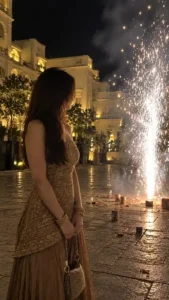
Create an ultra-realistic vertical 9:16 iPhone photo matching the reference. A young woman stands on the left, facing a bright fountain firework on the right. Her face is mostly silhouetted with warm rim lighting, and she has thick, dark hair. She wears the exact same outfit as shown in the reference picture. A grand cream-colored building with golden lights fills the background, while white-silver fireworks light up the dark sky and the stone ground. Preserve the original pose, outfit, proportions and composition. Keep her real facial identity, skin tone and hairstyle from the uploaded photo. Natural night lighting, realistic shadows, no beauty filters or artificial effects.
Why it works: “Matching the reference” tells ChatGPT to copy the composition and outfit and take only the face from your photo. That keeps the pose, proportions and lighting consistent.
Tips for Better Diwali AI Photos
- Use a sharp face photo. Dark, filtered or distant photos weaken identity matching.
- Prompts 1 and 3 keep the face partly in shadow. If you want the face clearer, add “soft warm fill light on the face, face clearly visible”.
- Flat fireworks? Add “bright glowing sparks, realistic smoke and light bloom”.
- Wrong outfit? Describe the color and fabric in plain words, like “cream cotton kurta with white stole”, and regenerate.
- Fix one thing at a time. Reply in the same chat with one change, like “keep everything the same, only make the sparks brighter”.
- Match your actual hair. If your hair is very different from the prompt, replace the hair line with “keep my exact hairstyle from the uploaded photo”.
Common Mistakes to Avoid
- Uploading a blurry or heavily filtered photo.
- Adding too many extra instructions. These prompts are already detailed.
- Removing the “no beauty filter” and “keep face” lines. Without them, ChatGPT smooths skin and changes the face.
- Posting the first result without checking the hands, fingers and face.
- Copying fireworks poses into real life. Keep sparklers at arm’s length and away from your face and clothes. Safe celebration beats a perfect photo.
Where to Post Your Diwali AI Photo
- Instagram grid: Crop to 4:5 or post the full 9:16 image.
- Instagram Stories and Reels cover: The vertical format fits perfectly.
- WhatsApp Status and DP: Post it on Diwali evening, around the Lakshmi Puja time in your city.
- Pinterest: Festival portraits get saved again every year around Diwali.
Use hashtags like #HappyDiwali #Diwali2026 #AIPhotoEditing #DiwaliPrompt. Muhurat timings differ by source and city: New Delhi’s Lakshmi Puja muhurat is listed as 5:54 PM to 7:50 PM on Drik Panchang, but other panchang sites show slightly different windows, so check your local panchang. vedantu
Frequently Asked Questions
When is Diwali 2026?
Diwali 2026 is on Sunday, 8 November 2026, with Lakshmi Puja on the evening of the same day. vedantu
Which tool is best for Diwali AI photo prompts?
ChatGPT works well for long, detailed prompts like these. Gemini also works, but check the face match more carefully and regenerate if needed.
Can girls use the boy prompt and boys use the girl prompt?
Yes. Change the outfit and hair lines and keep the lighting, pose and composition lines as they are.
How do I stop ChatGPT from changing my face?
Keep the face-lock line at the start of the prompt, upload a sharp photo, and use a follow-up like “restore my face to match the original uploaded photo, keep everything else the same”.
Why is my face dark in the fireworks photos?
Prompts 1 and 3 use strong backlighting on purpose. Add “soft warm fill light on the face” to show more of your face.
Are these prompts free?
Yes. The prompts are free to copy. ChatGPT’s free plan allows a limited number of image generations per day, so generate your favorite first.
Can I use these prompts for a family photo?
The couple prompt can be extended to a small group. Upload a photo where every face is sharp and add each person’s outfit as a separate line.
Final Thoughts
Diwali is the one festival where lights, fireworks and warm color already do most of the work for a photo. These three prompts use that light as the main source, so the result looks like a real night shot and not a filter. Pick your prompt, upload a clear photo, and post your Happy Diwali portrait before 8 November.
