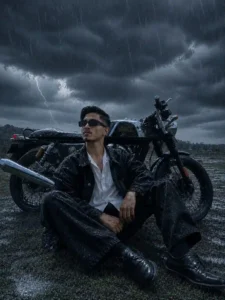
Baarish wala vibe, dramatic storm clouds, wet streets with reflections — and you standing right in the middle of it like a scene from a blockbuster movie. This ChatGPT AI photo prompt transforms any regular photo of a boy into a cinematic monsoon masterpiece. No editing skills needed. Just upload your photo, paste the prompt, and let ChatGPT do the rest.
What This Prompt Creates
This is not a simple filter. This prompt builds a complete Hollywood-grade monsoon scene around your existing photo — heavy rain streaks, realistic puddle reflections, water droplets on your clothes and surroundings, dark storm clouds with lightning, cinematic teal color grading, and atmospheric fog — all while keeping your face, pose, outfit, and background structure exactly the same.
The final result looks like a frame pulled straight from a high-budget action film shot during a powerful monsoon storm.
Rainy Weather Cinematic AI Photo Prompt
Upload your photo in ChatGPT and paste the full prompt below. Works best with GPT-4o image editing — both free and paid plans.
Transform the uploaded photo into a highly realistic rainy-weather cinematic scene while preserving the subject’s exact identity, facial features, pose, clothing, objects, environment structure, camera angle, and overall composition. Convert the existing weather into a dramatic monsoon atmosphere with heavy rainfall, realistic rain streaks, wet surfaces, reflective puddles, water droplets on all visible objects, damp textures, and natural rain interaction. Add massive storm clouds with deep blue-grey tones, distant lightning flashes, subtle fog, atmospheric mist, and a moody overcast sky. Enhance realism with accurate wet reflections, puddle reflections, rain splashes, and moisture buildup on surfaces. Use cinematic teal and dark cyan color grading, high contrast, volumetric lighting, soft atmospheric haze, HDR quality, and ultra-detailed textures. Maintain realistic skin tones and natural lighting while integrating rain effects seamlessly into the scene. Create depth with shallow depth of field, realistic perspective, and environmental storytelling. The final image should look like a frame from a high-budget Hollywood movie during a powerful monsoon storm, photorealistic, ultra-sharp, 8K quality, realistic weather simulation, professional cinematic photography, natural shadows, dramatic mood, and flawless rain rendering. Preserve all original elements while only transforming the weather and atmosphere into an authentic rainy-season masterpiece.Negative Prompt: cartoon, anime, CGI look, artificial rain, blurry subject, distorted face, altered identity, extra limbs, unrealistic reflections, oversaturated colors, low quality, low resolution, painting effect, plastic skin, excessive fog, unrealistic lightning, duplicated objects, bad anatomy, washed-out details, overprocessed image, fake wet surfaces, unrealistic shadows, motion artifacts, watermark, text, logo, cropped subject.
How to Use This Prompt
Step 1 — Choose the Right Photo
Pick a clear, well-lit photo where your face is visible. Outdoor photos work best — street, rooftop, garden, or any open space. Avoid heavily filtered or blurry photos.
Step 2 — Open ChatGPT
Go to chatgpt.com. Switch to GPT-4o mode. Make sure image generation and editing is available — it shows a small image icon in the chat input.
Step 3 — Upload Your Photo
Click the attachment icon and upload your photo directly in the chat.
Step 4 — Paste the Prompt
Copy the full prompt above — including the Negative Prompt line — and paste it in the same message as your photo. Hit send.
Step 5 — Download Full Resolution
Once generated, click the download button inside ChatGPT — not a screenshot. Full resolution download gives you the best quality for posting.
Final Thought
This rainy weather cinematic AI photo prompt turns any ordinary photo into a dramatic monsoon scene that looks straight out of a Hollywood production. The combination of cinematic teal grading, realistic rain physics, lightning in the clouds, and wet surface reflections creates a mood that no regular photo filter can match.